Preparing your download…
Add Bugmark to Chrome in under a minute.
Bugmark isn’t on the Chrome Web Store yet, so you install it from the download. It’s the same extension, and it updates the same way: download, replace the folder, reload.
v1.7.0 · 314 KB · .zip
- 1
Unzip the download
Openbugmark-chrome-extension.zipfrom your Downloads. On a Mac, double-click it; on Windows, right-click → Extract All. You’ll get a folder calledbugmark. Move it somewhere permanent, like Documents. Chrome runs the extension from this folder, so don’t delete it. - 2
Open the extensions page
Typechrome://extensionsin the address bar and press Enter.Browsers don’t allow websites to link to this page directly. - 3
Turn on Developer mode, then click “Load unpacked”
The switch is in the top-right corner. Click Load unpacked and choose thebugmarkfolder — the one that containsmanifest.json.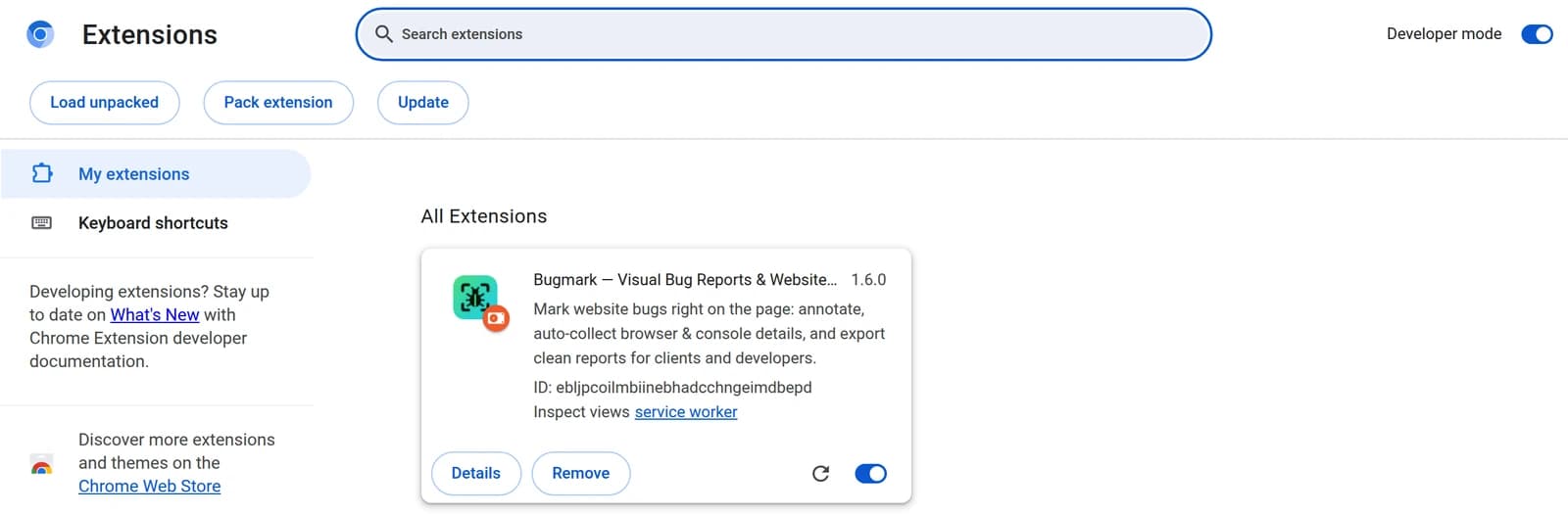
- 4
Pin it and start capturing
Click the puzzle-piece icon in the toolbar and pin Bugmark. Then open any site and press ⌥⇧S to mark up a screenshot or ⌥⇧R to record.
Updating
Download the new version, replace the contents of your bugmark folder, then click the reload ↻ icon on the Bugmark card. Your captures and settings stay.
Other browsers
Works in Edge (edge://extensions), Brave, Arc, Opera and other Chromium browsers based on Chrome 123 or newer.
“Disable developer mode extensions?”
Chrome may show this reminder for extensions installed from a folder. Choose Keep or close it. Bugmark keeps working.
Troubleshooting & file details
- “Manifest file is missing or unreadable” — you selected the zip or a parent folder. Unzip first and pick the folder that directly contains
manifest.json. - The button doesn’t appear on a page — refresh tabs that were open before installing. Browser pages like the Chrome Web Store or
chrome://pages can’t be annotated. - Recording has no voice — the first time, allow the microphone on the page Bugmark opens (Settings → General → allow microphone).
- SHA-256 603be0fc4d3d7106cfbbe972413e655392cc728fd614fd68fa36bf46c137c5d2 · extension ID ebljpcoilmbiinebhadcchngeimdbepd
Still stuck? Email support@your-domain.com.