guide
How to write a bug report developers can actually fix
A good bug report lets someone who has never seen the problem reproduce it in minutes. This guide covers the fields every report needs, a copy-paste bug report template, a real example, and the mistakes that send tickets back with "can't reproduce".
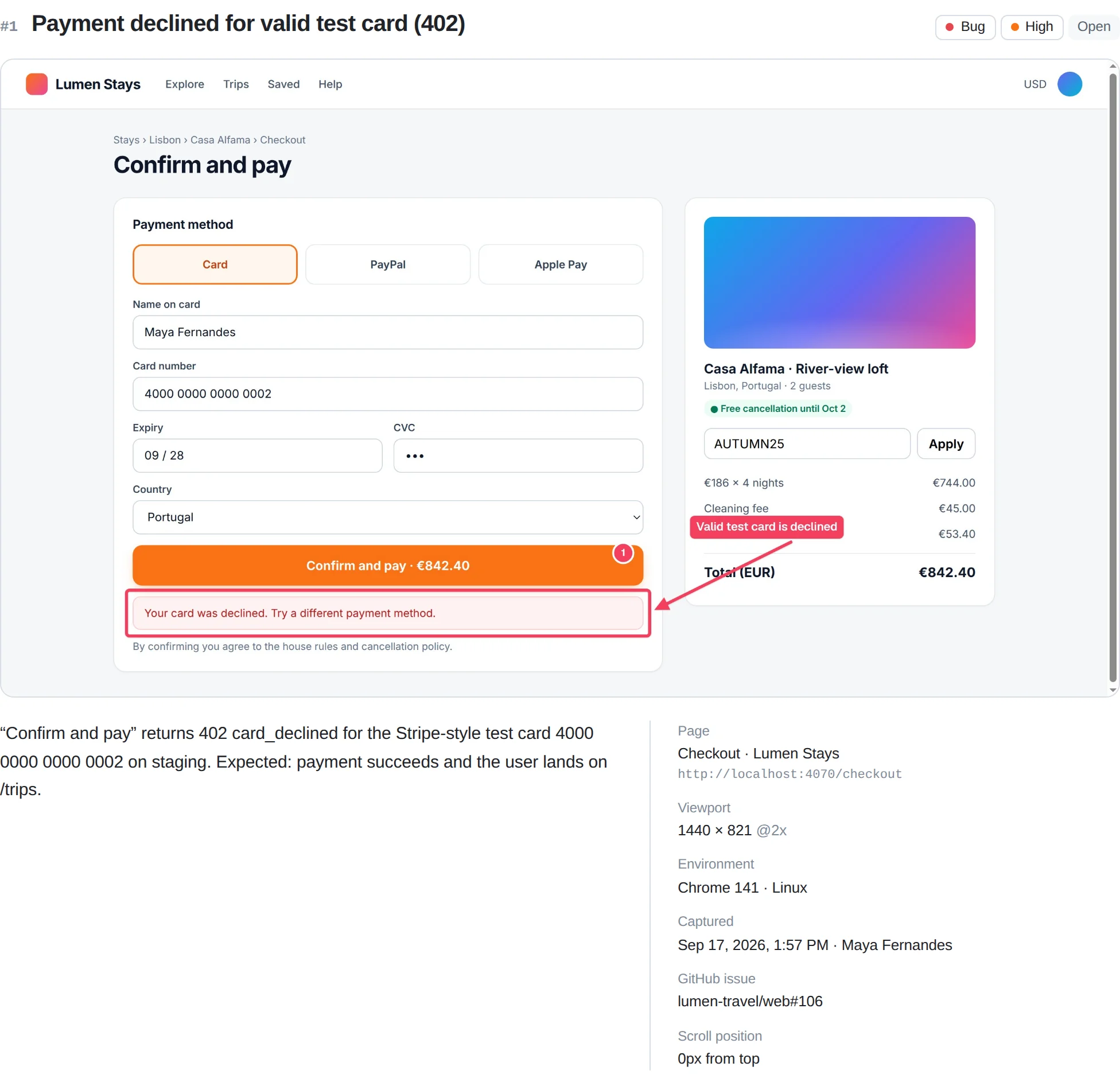
Quick answer
How to write a bug report
Write a specific one-line title, then list the environment (URL, browser, OS, viewport), numbered steps to reproduce, the expected result and the actual result. Attach an annotated screenshot or recording plus console errors and failing network requests. Note how often it happens and how badly it hurts users.
What a good bug report includes
Every field in a bug report exists to answer a question the developer would otherwise have to ask you. If you fill in the fields below, most bugs can be reproduced and triaged without a single follow-up message.
| Field | What to write | Why it matters |
|---|---|---|
| Title | Where + what is broken, in one line | Makes the ticket searchable and easy to triage |
| Environment | URL, browser and version, OS, viewport, account role, build | Many bugs only appear in one browser, size or role |
| Steps to reproduce | Numbered actions from a known starting point | The developer must see the bug before fixing it |
| Expected result | What should have happened | Separates a bug from a misunderstanding |
| Actual result | What happened, with exact error text | Gives the symptom to search for in code and logs |
| Evidence | Screenshot, recording, console log, network log | Shows what words cannot and exposes the root cause |
| Frequency | Always, intermittent (3 of 10), once | Intermittent bugs need a different debugging approach |
| Severity / priority | Impact on users and business | Decides what gets fixed first |
The single most important field is steps to reproduce. If you only have time to do one thing well, do that. Our steps to reproduce template goes deeper on writing them.
How to write a bug report, step by step
- Reproduce the bug yourself. Try it again from a clean start (refresh, or a new incognito window) so you know the exact path that triggers it and whether it happens every time.
- Search for an existing report. Check your tracker for the error message or page name. Add your details to an existing ticket instead of filing a duplicate.
- Write a specific title. Use the pattern "[Where] [what is wrong] [when]": for example, "Checkout button does nothing on /cart when a coupon is applied".
- Record the environment. Copy the full URL and note the browser and version (
chrome://version), operating system, window size, the account or role you used, and the release if you know it. - List the steps to reproduce. Number each action, start from a known state, and use the exact labels you see on screen.
- State expected versus actual. Put them on separate lines. Quote error messages exactly rather than paraphrasing them.
- Attach evidence. Add an annotated screenshot or short recording, the console errors, and the failing network request. See how to capture console logs and how to capture a HAR file in Chrome.
- Set severity and frequency, then proofread. Read the report as if you were the developer. Remove guesses presented as facts and any passwords or personal data.
Bug report template (Markdown)
Copy this bug report format into GitHub, Jira, Linear or any tracker that accepts Markdown. It is filled in with a realistic example so you can see the level of detail that works.
## Summary
Checkout button does nothing on /cart when a coupon is applied

## Environment
- URL: https://shop.example.com/cart
- Browser: Chrome 140 (macOS 15.5)
- Viewport: 1440x900, device pixel ratio 2
- Account / role: test user, logged in
- Build or release: web 4.12.0

## Steps to reproduce
1. Log in as a test user.
2. Add any item to the cart.
3. Go to /cart and apply the coupon SAVE10.
4. Click "Checkout".

## Expected result
The checkout page opens.

## Actual result
Nothing happens. The console shows
"TypeError: Cannot read properties of undefined (reading 'total')".
POST /api/checkout returns 500.

## Frequency
Every time (5 of 5 attempts)

## Severity / priority
High: blocks purchases with a coupon

## Attachments
- Annotated screenshot
- Console log (.log)
- Network log (HAR, sanitized)
Why this is a good bug report example: the title names the page and the trigger, the steps start from a known state, the actual result quotes the exact error, and the failing request (POST /api/checkout returning 500) points the developer straight at the likely cause.
Bad vs. good: a quick comparison
| Weak report | Strong report |
|---|---|
| "Checkout is broken" | "Checkout button does nothing on /cart when a coupon is applied" |
| "It doesn't work on my computer" | "Chrome 140, macOS 15.5, 1440x900, logged in as test user" |
| "I tried to buy something and it failed" | Four numbered steps with the coupon code and button label |
| "There was some error" | Exact console message plus POST /api/checkout 500 |
| No attachments | Annotated screenshot, console log and sanitized HAR |
Common bug reporting mistakes
- Several bugs in one ticket. File one report per problem so each can be assigned, fixed and closed independently.
- Vague titles. "Bug on homepage" is impossible to search for or prioritize.
- Skipping the starting state. Steps that begin halfway through a flow are the top cause of "can't reproduce".
- Paraphrasing errors. "Some JavaScript error" hides the stack trace a developer needs. Copy it exactly.
- Screenshots without context. A cropped image with no URL, arrow or note leaves the reader guessing what is wrong.
- Sharing secrets. Raw HAR files and screenshots can contain session cookies, tokens and customer data. Redact before you attach.
- Guessing the cause as fact. Put theories in a separate "Notes" line so they do not send the developer in the wrong direction.
The faster way: Bugmark
Writing all of this by hand takes 10 to 15 minutes per bug, and the technical parts are the easiest to get wrong. Bugmark is a free Chrome extension that fills in most of the template for you the moment you capture.
- Annotated screenshot or recording: arrows, boxes, numbered pins, text and a redact tool, or a tab recording with voice narration up to 5 minutes.
- Steps to reproduce, recorded automatically: the last 30 actions in the tab (clicks with element labels, which fields were typed in but never the text). You can edit them before saving.
- Console and network context: the last 150 console messages and JavaScript errors, plus the last 150 network requests with status, timing and payloads, with passwords, tokens and cookies masked as
[redacted]. - Environment: URL, page title, browser, OS, viewport, pixel ratio and scroll position.
- Export anywhere: copy as Markdown for GitHub, Jira, Linear or Slack, export CSV or a self-contained HTML report, or create a GitHub issue directly.
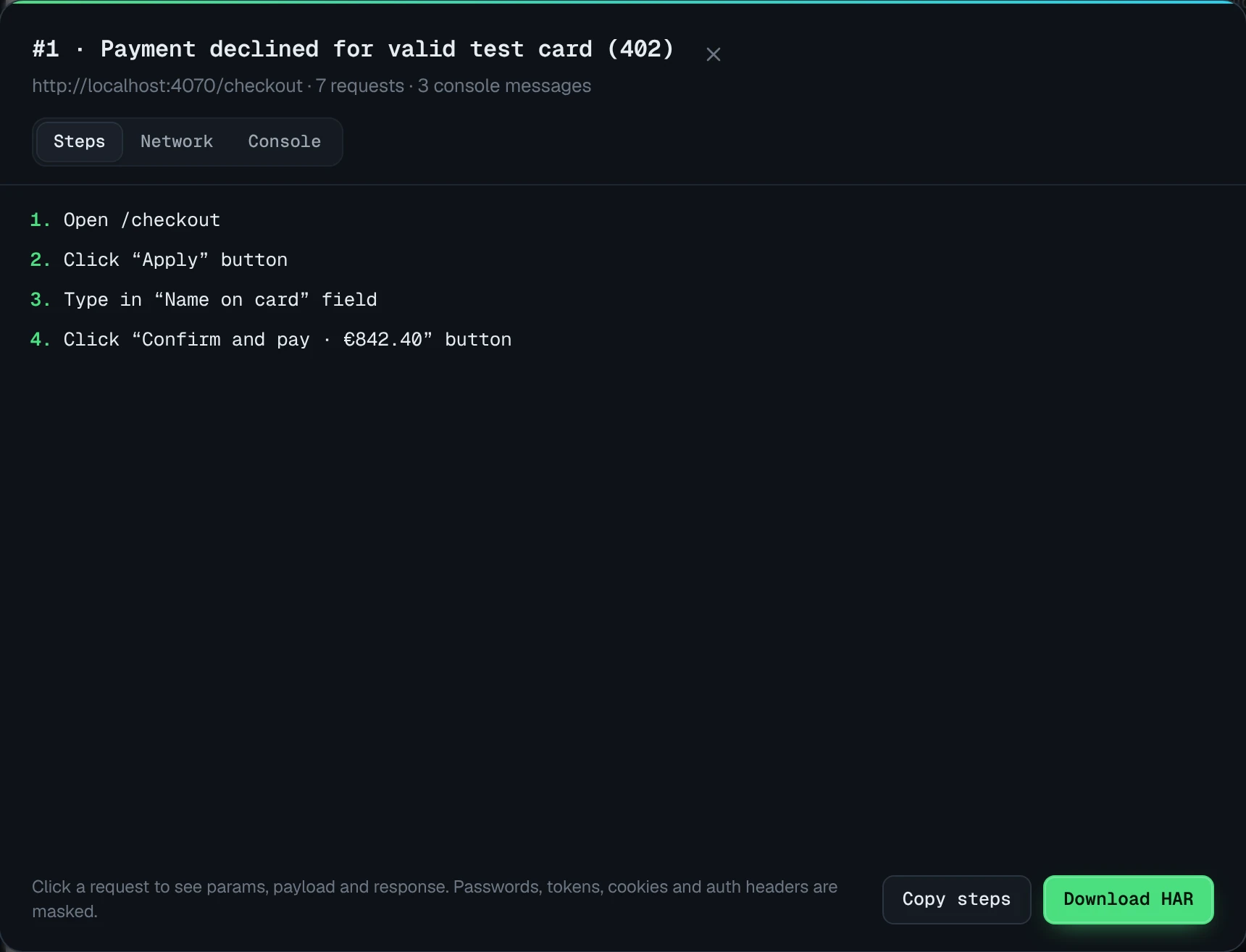
Everything is stored locally in your browser, with no account required. Add Bugmark to Chrome — free
How to write a bug report
- 1
Reproduce the bug
Trigger the bug again from a clean starting state so you know the exact path and whether it happens every time.
- 2
Check for duplicates
Search your issue tracker for the error message or page name and add to an existing ticket if one exists.
- 3
Write a specific title
Summarize where the problem is, what is wrong and when it happens in a single line.
- 4
Record the environment
Note the full URL, browser and version, operating system, viewport size, account role and release.
- 5
List steps to reproduce
Write numbered actions from a known starting point using the exact labels shown on screen.
- 6
State expected and actual results
Describe what should happen and what actually happens, quoting any error text exactly.
- 7
Attach evidence
Add an annotated screenshot or recording, console errors and a sanitized network log.
- 8
Set severity and proofread
Add frequency and severity, remove sensitive data and reread the report as the developer would.
Frequently asked questions
What are the key elements of a bug report?
A useful bug report has a specific title, the environment (URL, browser, operating system, viewport and account), numbered steps to reproduce, the expected result, the actual result with exact error text, visual evidence such as a screenshot or recording, and notes on frequency and severity. Console errors and failing network requests make it much easier for developers to find the cause.
How long should a bug report be?
As short as possible while still letting someone reproduce the problem without asking you questions. Most good reports fit on one screen: a one-line title, a few environment details, three to eight steps, and one line each for expected and actual results. Put long logs in attachments instead of pasting them into the description.
What is the difference between severity and priority?
Severity describes how badly the bug affects the product, for example a crash or data loss versus a cosmetic typo. Priority describes how soon the team should fix it, which also depends on business factors such as how many users are affected or an upcoming launch. A reporter usually suggests severity, while the product owner sets priority.
Should I include screenshots in a bug report?
Yes, for almost every visual or UI bug. Annotate the screenshot with an arrow or box so the problem is obvious, and include the URL so the image has context. For bugs that involve motion, timing or several steps, a short screen recording with narration is usually clearer than a series of screenshots.
What should I do if I cannot reproduce the bug?
Report it anyway, but say so clearly. Describe what you were doing, the exact time it happened, the URL, your browser and any error text you saw. Mark frequency as "seen once" and attach any console or network logs you captured. Timestamps help developers find matching entries in server logs.
Try Bugmark free — no account needed
- Screenshots & screen recording
- Console & network logs
- Steps to reproduce
- GitHub issues & reports