best bug reporting tools
The best bug reporting tools in 2026, compared honestly
Nine visual bug reporting tools that show up again and again on shortlists, compared on who they suit, what they capture, what the free plan really includes and where each one falls short. No tool wins every category, so we point out the best fit for each kind of team.
Disclosure: who wrote this list
Published by the Bugmark team
This comparison is written by the people who make Bugmark, one of the tools on the list. We have tried to be fair: every competitor fact below comes from that vendor's own website, we name Bugmark's real limits, and we recommend other tools where they are the better fit. Details checked October 2026 from each tool's public website.
We compared each tool on the questions a team usually asks before installing one: who reports bugs (your QA team, your clients or your end users), how much developer context is attached, where the data lives, how pricing scales, and which issue trackers it connects to.
Quick picks
- Best for shareable bug links across a product team: Jam.
- Best for agencies collecting client feedback on websites: Marker.io or BugHerd.
- Best for in-app feedback from end users: Userback or Usersnap.
- Most generous free plans with a replay buffer: BetterBugs and Crosscheck.
- Best for explaining a bug on video: Loom.
- Our pick for private, local-first reports with no account and no subscription: Bugmark.
Bug reporting tools comparison table
| Tool | Best for | Free plan | Local vs cloud | Console + network capture | Integrations |
|---|---|---|---|---|---|
| Jam | Product and engineering teams sharing bug links | Yes, 30 Jams/month | Cloud (hosted links) | Yes, on all plans | Jira, Linear, Slack, webhooks |
| Marker.io | Agencies and client website feedback | No, 15-day trial | Cloud | Team plan and above | Jira, Linear, GitHub, GitLab, Asana, ClickUp and more; two-way sync |
| BugHerd | Client feedback pinned to live sites | No, free trial | Cloud | Console logs; network not listed | Slack, GitHub, Trello; Jira, Linear, Asana on Premium+ |
| Userback | Product teams collecting user feedback | Yes, 2 seats, 7-day feedback access | Cloud | Business plan and above | Jira, Linear, ClickUp, Slack, Zendesk, MCP |
| Usersnap | Customer feedback programs at scale | No, trial up to 20 feedback items | Cloud | JavaScript and network errors | Jira, Azure DevOps, Linear, Slack, Zendesk, 50+ |
| BetterBugs | QA teams wanting a free replay buffer | Yes: 5 seats, 1 project, 30 sessions | Cloud | Yes, on the free tier | Project tools and issue trackers; Jira two-way sync on Team |
| Crosscheck | Small teams wanting instant replay free | Yes, 3 members, 1 project | Cloud | Yes, on the free plan | Jira, ClickUp, MCP |
| Loom | Async video walkthroughs | Yes, 25 videos/person | Cloud | Bug report mode on Business + AI and Enterprise | Jira, Confluence, Slack and more |
| Bugmark | Developers and QA who want private, local reports | Free to try: every feature, 2 saved reports | Local, in your browser | Yes, with payloads and responses | GitHub issues; CSV and Markdown export |
Details checked October 2026 from each tool's public website. Plans and prices change often, so confirm on each vendor's pricing page before you buy.
2. Marker.io: best for agencies and client feedback
Marker.io is a website feedback and bug reporting platform with an embeddable widget and a browser extension. Its standout feature is guest reporting: clients and stakeholders can submit annotated feedback without an account, and issues sync both ways with the project tool your team already uses.
- Best for: agencies, web studios and teams running client reviews or UAT.
- Key capabilities: widget and extension, guest reporting, two-way sync, and session replay with console logs and network requests on the Team plan and above.
- Free plan: no. Every plan starts with a 15-day free trial with no credit card required.
- Pricing: Starter, Team and Business tiers billed monthly or yearly; Jira and Azure DevOps are on Team and above. See their pricing page for current figures.
- Downside: the entry plan does not include console logs, network requests or session replay, so developer context costs more.
Compare in detail: Bugmark vs Marker.io.
3. BugHerd: best for pinned feedback on live websites
BugHerd lets reviewers point at an element on a live page and leave a comment that becomes a task on a built-in kanban board. Each task captures a screenshot with the URL, browser, operating system, screen resolution and the selected element. It works through a script on your site or a browser extension.
- Best for: agencies and freelancers who want clients to leave visual feedback and track it on a board.
- Key capabilities: pinned comments, unlimited client users, a task board, video feedback sessions, and console logs on bug reports.
- Free plan: no. There is a free trial; see their pricing page for its length.
- Pricing: Standard, Studio, Premium and Custom plans priced by team members and storage (Standard includes 5 members and 10 GB). Jira, Linear, Asana and ClickUp integrations are on Premium and above.
- Downside: it is built for feedback and task management rather than deep debugging; network request capture is not listed on its pricing page.
Compare in detail: Bugmark vs BugHerd.
4. Userback: best for in-app user feedback
Userback describes itself as user feedback software for product teams. Beyond bug reports with annotated screenshots, it covers surveys, NPS, a feature request portal with voting and a public roadmap, with a feedback widget for your app and a browser extension for internal testers.
- Best for: SaaS product teams that want bug reports and feature requests from real users in one place.
- Key capabilities: feedback widget and extension, screen annotation, video feedback, session replay and console logs, plus an MCP integration for AI tools.
- Free plan: yes. Free Forever includes 2 seats and 2 feedback projects, but feedback is only accessible for 7 days unless you upgrade.
- Pricing: Team, Business and Business Plus tiers. Console logs and session replay start on Business. See their pricing page for current prices.
- Downside: the developer context that makes bug reports actionable sits on the higher tiers.
5. Usersnap: best for large customer feedback programs
Usersnap is a customer feedback platform: in-app widgets, surveys, announcements and an opportunity board, plus visual bug reports. Its browser extension captures feedback and screenshots from any page without installing a widget, and it records user-side JavaScript and network errors with each item.
- Best for: product and customer experience teams that run feedback at scale across many channels.
- Key capabilities: widgets, surveys, screen and audio recording, JavaScript and network error capture, two-way sync with Jira, Azure DevOps, Asana and Linear, and 50+ integrations.
- Free plan: no. The free trial unlocks Premium features until you collect 20 feedback items.
- Pricing: Starter, Growth, Professional, Premium and Enterprise tiers, priced in euros. Starter includes 2 seats and 2 projects.
- Downside: it is a broad feedback suite, which is more than a developer who only needs bug reports may want to pay for.
6. BetterBugs: best free plan with a rewind buffer
BetterBugs is a bug reporting Chrome extension aimed at QA teams. Its Rewind feature records the last two minutes of browser activity in the background, so you can report a bug after it happens. Reports include console logs, network requests, environment details, cookies and app storage data.
- Best for: QA testers and small teams who want a capable free plan with retroactive capture.
- Key capabilities: screenshots and recordings, Rewind on all plans, console and network logs on the free tier, AI repro steps, an MCP server, and integrations with project tools and issue trackers.
- Free plan: yes. 5 seats, 1 project, 30 sessions per workspace, 10 recording links a month, 5-minute recordings and 1 month of data retention.
- Pricing: paid Team plan priced per seat (with 15-minute recordings, 1-year retention, Jira two-way sync and more integrations) and Enterprise. See their pricing page for current prices.
- Downside: reports are stored in BetterBugs' cloud, and private sessions and some integrations are reserved for paid plans.
7. Crosscheck: best for small teams wanting instant replay
Crosscheck is a newer visual bug reporting Chrome extension. It captures screenshots, recordings, console logs with level filters, network requests, performance data and user actions written as readable steps, plus an instant replay of recent activity.
- Best for: small product teams that want full-context captures and Jira or ClickUp tickets on a free plan.
- Key capabilities: 5-minute recordings, a 2-minute instant replay on the free plan, annotation with blur, and integrations with Jira, ClickUp and AI tools through MCP.
- Free plan: yes. Up to 3 members, 1 project and 30 recording links per month.
- Pricing: Pro is priced per seat ($10 per seat per month billed yearly at the time of writing), with a 7-day trial.
- Downside: an account is required, and the free plan's single project and member cap will be tight for agencies or growing teams.
8. Loom: best for explaining a bug on video
Loom is not a dedicated bug tracker, but plenty of teams use it to show bugs. You record your screen and camera, share a link and collect comments. On Business + AI and Enterprise plans, Loom's Chrome extension adds a bug report mode that attaches device information, console logs and network request metadata, and can turn a video into a Jira work item.
- Best for: teams already using Loom and Atlassian tools who want narrated walkthroughs.
- Key capabilities: screen and camera recording, transcripts, comments, hosted links and Jira integration.
- Free plan: yes. Starter includes up to 25 videos per person and 5-minute recordings.
- Pricing: Business and Business + AI are priced per user per month; Enterprise is custom.
- Downside: bug report mode needs a higher tier and, per Atlassian's docs, network response data is still in development.
Compare in detail: Bugmark vs Loom for bug reports.
9. Bugmark: our pick for local-first, private bug reports
Bugmark is the Chrome extension we build. It takes a different approach from every tool above: there is no account and no cloud workspace. Screenshots, recordings and logs are stored locally in your browser (IndexedDB), and data leaves your device only when you export a report or create a GitHub issue.
- Best for: developers, QA engineers and freelancers who want developer-grade reports that stay private, especially on staging, localhost or client work.
- Key capabilities: annotation with pins, labels and redaction; visible, full-page, delayed and element captures; mobile, tablet and desktop breakpoints in one shot; tab recording with voice up to 5 minutes; the last 150 console messages; the last 150 network requests with payloads and responses for recent fetch/XHR calls, secrets masked as
[redacted]; the last 30 actions as steps to reproduce; Copy as cURL and HAR download. - Free plan: free to try with every feature unlocked, limited to 2 saved reports at a time.
- Pricing: a one-time $15 Pro payment removes the limit. No subscription and no seats.
- Downsides: no hosted share links or team workspace, no guest widget for clients, no instant replay, no camera recording, no native Jira or Linear integration (CSV and Markdown export instead), and it runs only in Chrome and Chromium browsers such as Edge, Brave and Arc.
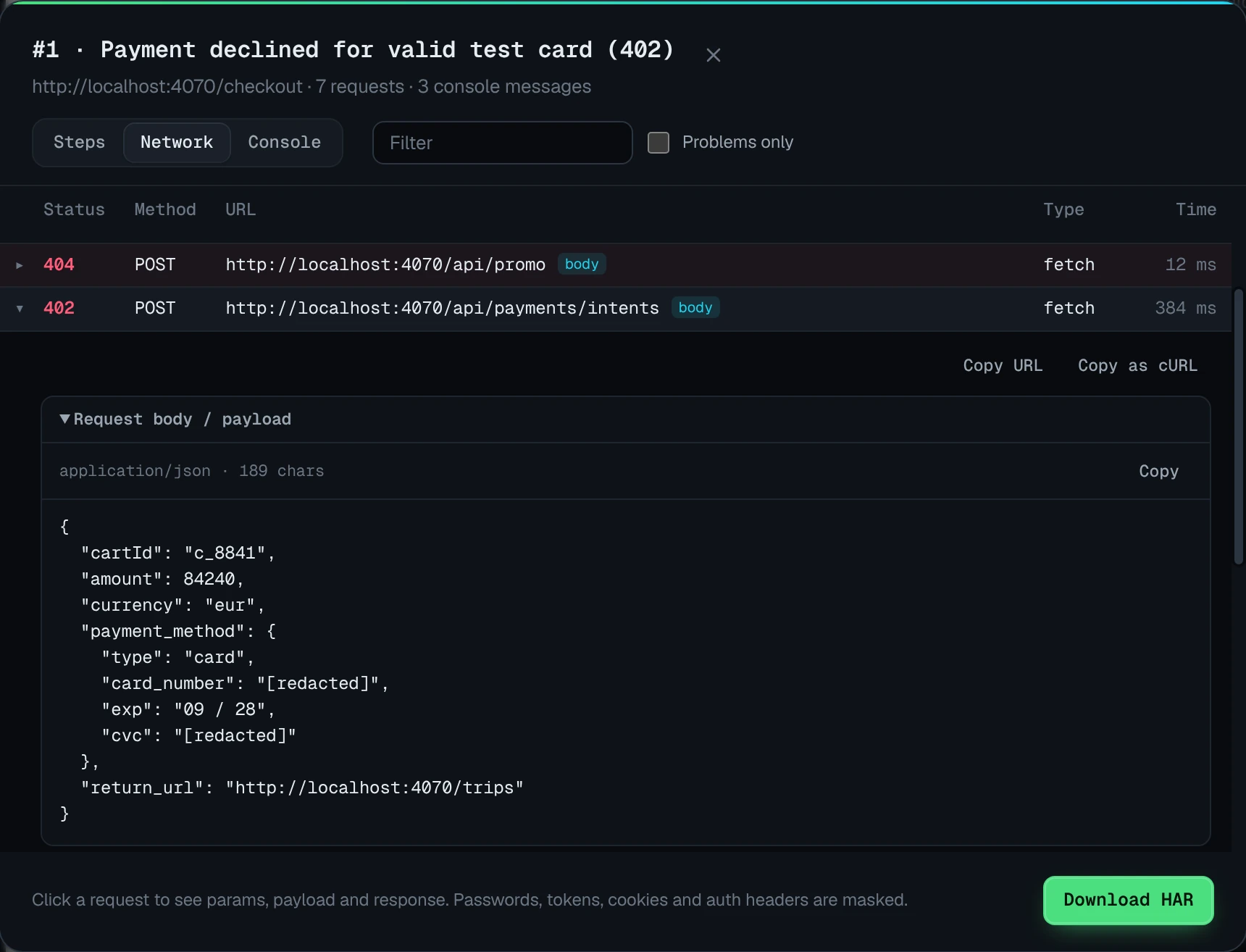
Reports export as self-contained HTML, PDF, CSV or Markdown, with white-label branding, and GitHub issues include screenshots, recordings and the HAR file. See the full bug reporting tool overview.
Also worth a look: Shake for mobile apps
If your bugs live in native apps rather than the browser, the Chrome extensions above will not help much. Shake is an SDK for iOS, Android, React Native, Flutter and web that attaches device data, HTTP logs and repro steps to reports, and its pricing page lists a free plan with 20 bug reports per month. See their pricing page for paid tiers.
How to choose a bug reporting tool
Most teams pick the wrong tool by comparing feature lists instead of workflows. Start with these six questions, in order.
- Who files the reports? Clients and end users need a widget or a link with nothing to install (Marker.io, BugHerd, Userback, Usersnap). Internal QA and developers are fine with an extension (Jam, BetterBugs, Crosscheck, Bugmark).
- How much developer context do you need? Check whether console logs and network requests are on the plan you will actually buy, and whether network capture includes request and response bodies or only status codes.
- Where should the data live? Cloud tools make sharing easy. Local-first tools keep captures on your machine, which can simplify security reviews for client, healthcare or internal work.
- How does pricing scale? Per-seat plans grow with your team; flat plans grow with projects or storage; a one-time license does not grow at all. Read free plan limits carefully: monthly caps, seat caps, project caps and data retention all count.
- Which tracker do you use? Native two-way sync with Jira, Linear or Azure DevOps matters if triage happens there. If you live in GitHub, direct issue creation with attachments saves the most time.
- How will people view reports? Hosted links suit stakeholders who will never install anything. Exported HTML or PDF reports suit handoffs, audits and client deliverables.
Whatever you choose, the tool only helps if the report is good. Our guide on how to write a bug report covers the fields every report needs.
Best free bug reporting tools in 2026
"Free" means very different things across these tools. Here is what you get without paying, based on each vendor's site.
| Tool | What free gets you | Main limit |
|---|---|---|
| Jam | Free plan with console and network logs | 30 Jams and 5 Recording Links per month |
| BetterBugs | Free plan with Rewind, console and network logs | 5 seats, 1 project, 30 sessions per workspace, 1-month retention |
| Crosscheck | Free plan with instant replay, console and network | 3 members, 1 project, 30 recording links per month |
| Userback | Free Forever plan with 2 seats | Feedback accessible for 7 days; no console logs on free |
| Loom | Starter video plan | 25 videos per person, 5-minute recordings; no bug report mode |
| Bugmark | Every feature unlocked, no account | 2 saved reports at a time; $15 once to remove the limit |
| Marker.io, BugHerd, Usersnap | Free trial only | No free plan |
For a solo developer, a free plan with monthly caps may be enough. For a team that files many reports, compare the cost of the paid tier you will grow into, not just the free one.
Our verdict
There is no single best bug reporting tool. If your reports need to reach a whole product team in one click, Jam is excellent. If clients are the ones reporting, Marker.io and BugHerd are built for that. If you want feedback from end users alongside bug reports, look at Userback or Usersnap. If you want a strong free plan with a replay buffer, try BetterBugs or Crosscheck. And if you want private, detailed reports that stay on your machine with a one-time price instead of a subscription, that is exactly why we built Bugmark.
For deeper head-to-head comparisons, read Bugmark vs Userback, Bugmark vs BetterBugs and Bugmark vs Usersnap. Want to try Bugmark? Add it to Chrome; every feature is unlocked from the first install.
Frequently asked questions
What is the best bug reporting tool in 2026?
It depends on who reports bugs. Jam is a strong choice for product teams sharing bug links, Marker.io and BugHerd suit agencies collecting client feedback, Userback and Usersnap suit in-app user feedback, and BetterBugs and Crosscheck offer generous free plans. Bugmark is our pick for private, local-first reports with a one-time price. This list is published by the Bugmark team.
Which bug reporting tools have a free plan?
As of October 2026, Jam, BetterBugs, Crosscheck, Userback and Loom list free plans, each with limits such as monthly report caps, seat caps or short data access. Bugmark is free to try with every feature unlocked but keeps up to 2 saved reports at a time. Marker.io, BugHerd and Usersnap offer free trials rather than free plans.
Which bug reporting tools capture console logs and network requests?
Jam, BetterBugs, Crosscheck and Bugmark capture console logs and network requests on their free tiers. Marker.io includes them on the Team plan and above, Userback on Business and above, and Loom's bug report mode on Business + AI and Enterprise. Usersnap records JavaScript and network errors, and BugHerd lists console logs.
Is there a bug reporting tool that does not upload my data?
Bugmark stores screenshots, recordings and logs locally in your browser and does not upload captures to its servers. Data leaves your device only when you export a report or create a GitHub issue. The other tools in this list are cloud services, which makes sharing easier but means captures are stored on the vendor's servers.
What is the best bug reporting tool for client feedback?
For client feedback on websites, Marker.io and BugHerd are the strongest fits because clients can report without creating an account and feedback lands in a shared board or your project tool. Bugmark does not offer a client widget, but it can export self-contained HTML or PDF reports that clients open without installing anything.
How much does Bugmark cost?
Bugmark is free to try with every feature unlocked, limited to 2 saved reports at a time. A one-time $15 Pro payment removes the limit for unlimited reports. There is no subscription, no seats and no account required, and your captures are stored locally in your browser.
Try Bugmark free — no account needed
- Screenshots & screen recording
- Console & network logs
- Steps to reproduce
- GitHub issues & reports