Free Chrome extension · works on any website
Found a bug? Report it in one click.
Bugmark is a browser extension for anyone who finds bugs — testers, product managers, designers and clients. Snap a screenshot or record your screen, and Bugmark adds everything a developer needs to fix it, automatically. No account, nothing to set up.
- 1Add to Chrome
- 2Click Bugmark on any page
- 3Send the report
- Free to try · $7.99 to own
- No account needed
- Data stays on your device
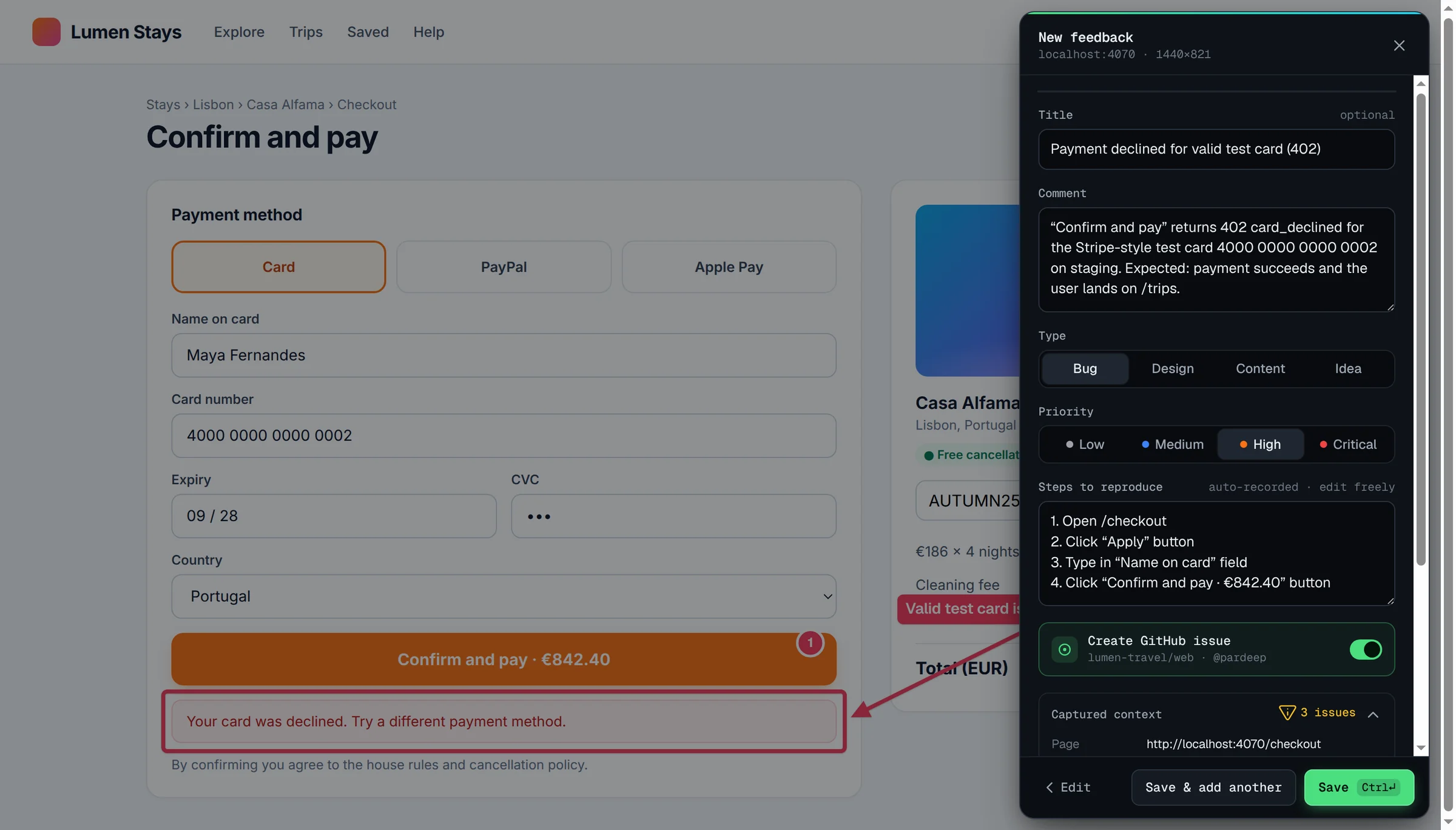
What your developer receives: the screenshot, what you clicked, and the technical details — in one report.
Every report includes
- Marked-up screenshot
- Screen recording
- Every step you took
- What failed to load
- Errors on the page
- Browser & device
- Phone, tablet & desktop
how it works
See Bugmark in one minute
From spotting a bug to a report your developer can fix — no account, nothing to set up.
- 01
Add it to Chrome
Two clicks from the Chrome Web Store. No account, nothing to set up.
- 02
Capture the bug
Click Bugmark on any page. Circle the problem on a screenshot, or record your screen.
- 03
Send it
Bugmark attaches the steps you took and what went wrong in the page. Send it to GitHub or share the report.
product
Capture the bug the way you found it.
A screenshot, a recording or three screen sizes. Whatever shows the problem best, in a couple of seconds.
Point at the problem, right on the page.
Press ⌥⇧S on any site, including localhost, staging or pages behind a login. Draw, drop numbered pins, add labels and press Enter.
- Pen, highlighter, arrows, shapes, text and pins
- Visible area, full page or a 3-second delay for hover states
- Pixelate emails and secrets before anything is saved
- Element inspector attaches the CSS selector and styles
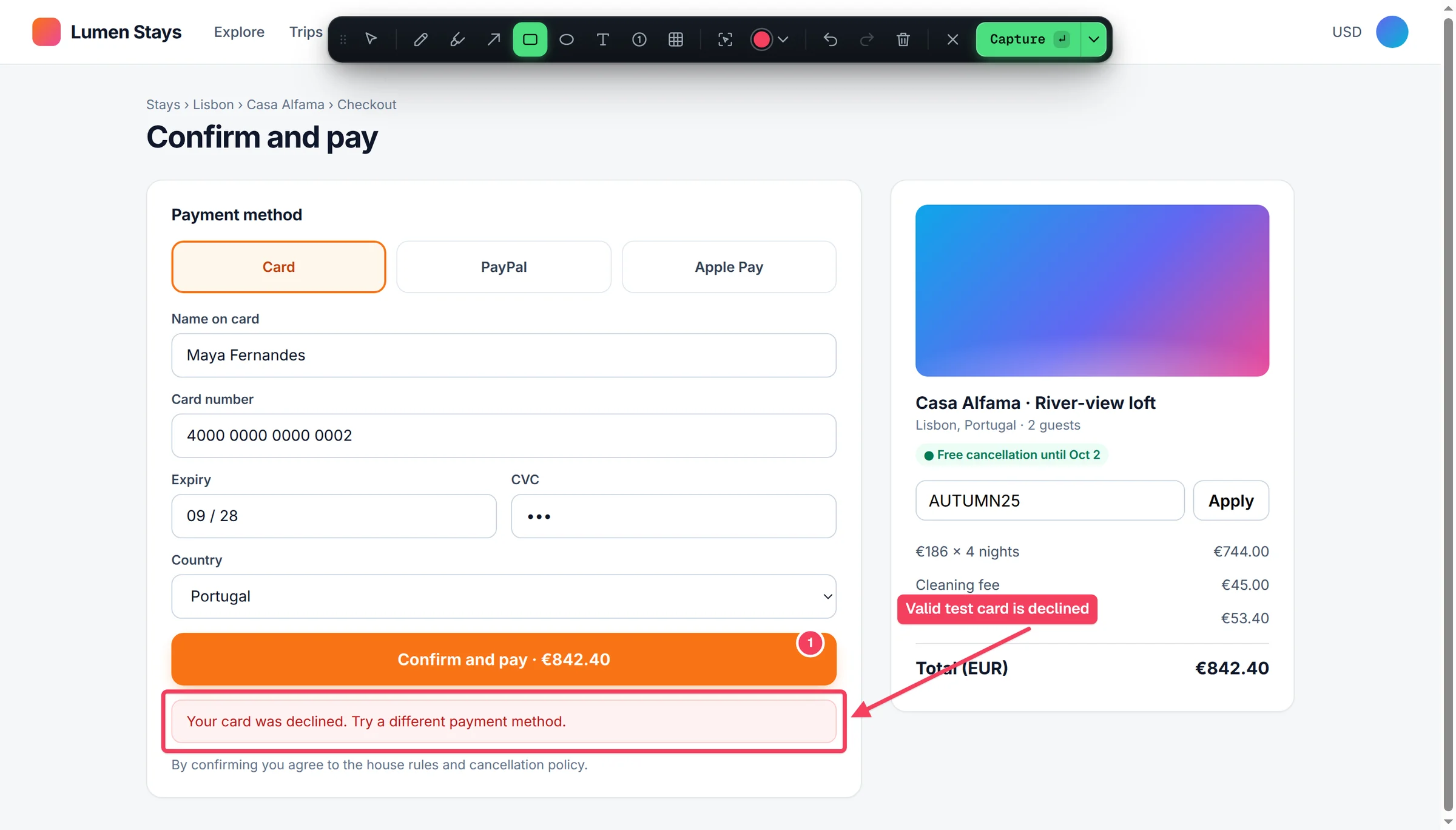
Some bugs need to be seen moving.
Record the tab with your voice when a screenshot isn’t enough: flickers, animations or a flow that breaks on step four.
- One click from the toolbar, popup or ⌥⇧R
- Narrate with your microphone as you go
- Keeps recording across page loads, up to 5 minutes
- Plays back in the report, and attaches to GitHub issues
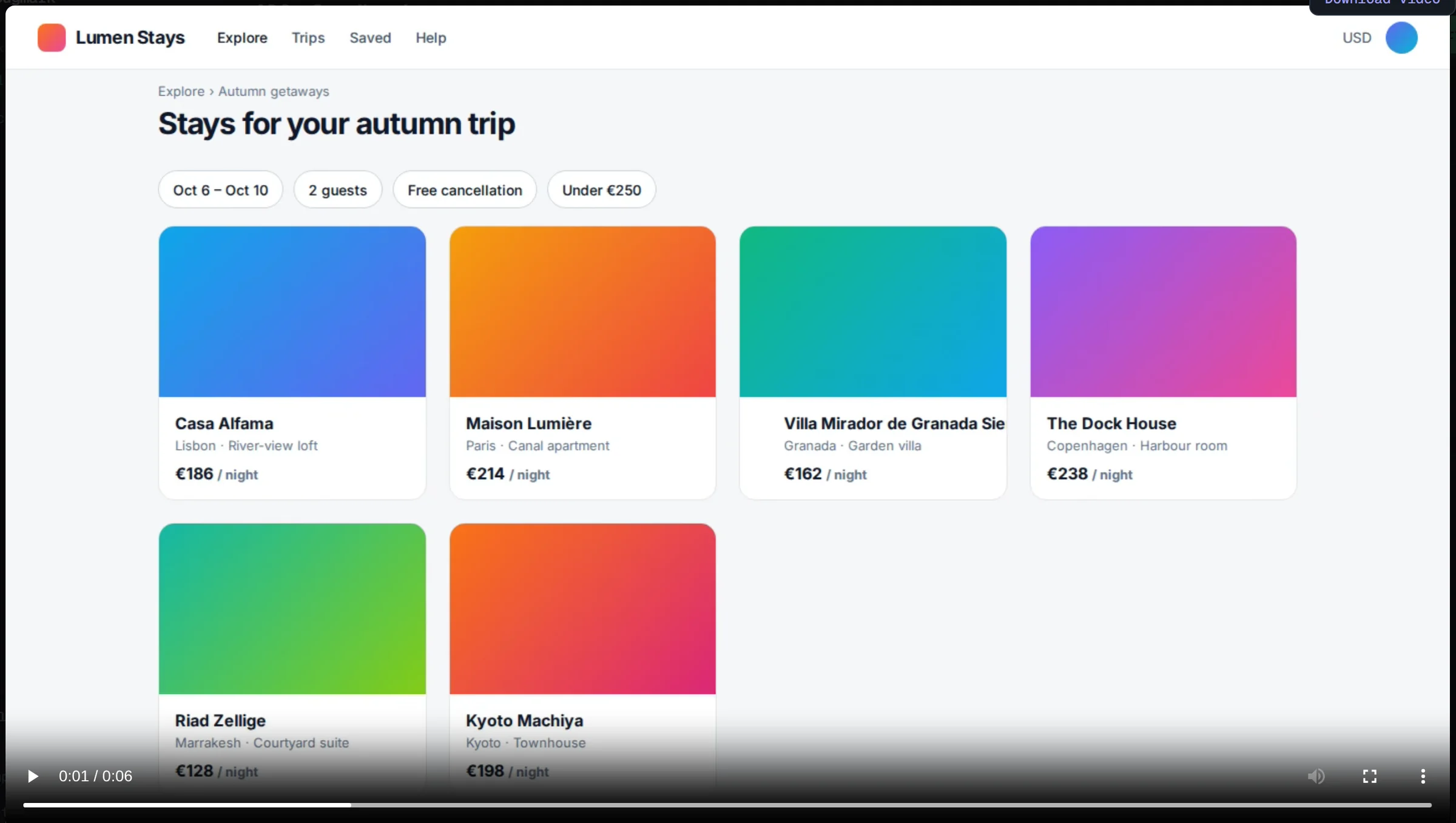
Mobile, tablet and desktop in one capture.
Bugmark re-renders the page at 390, 768 and 1440px using Chrome’s device emulation, so layout bugs show up next to the version that works.
- No resizing windows or DevTools device mode
- Real layout at each width, not a scaled screenshot
- Saved as one side-by-side image
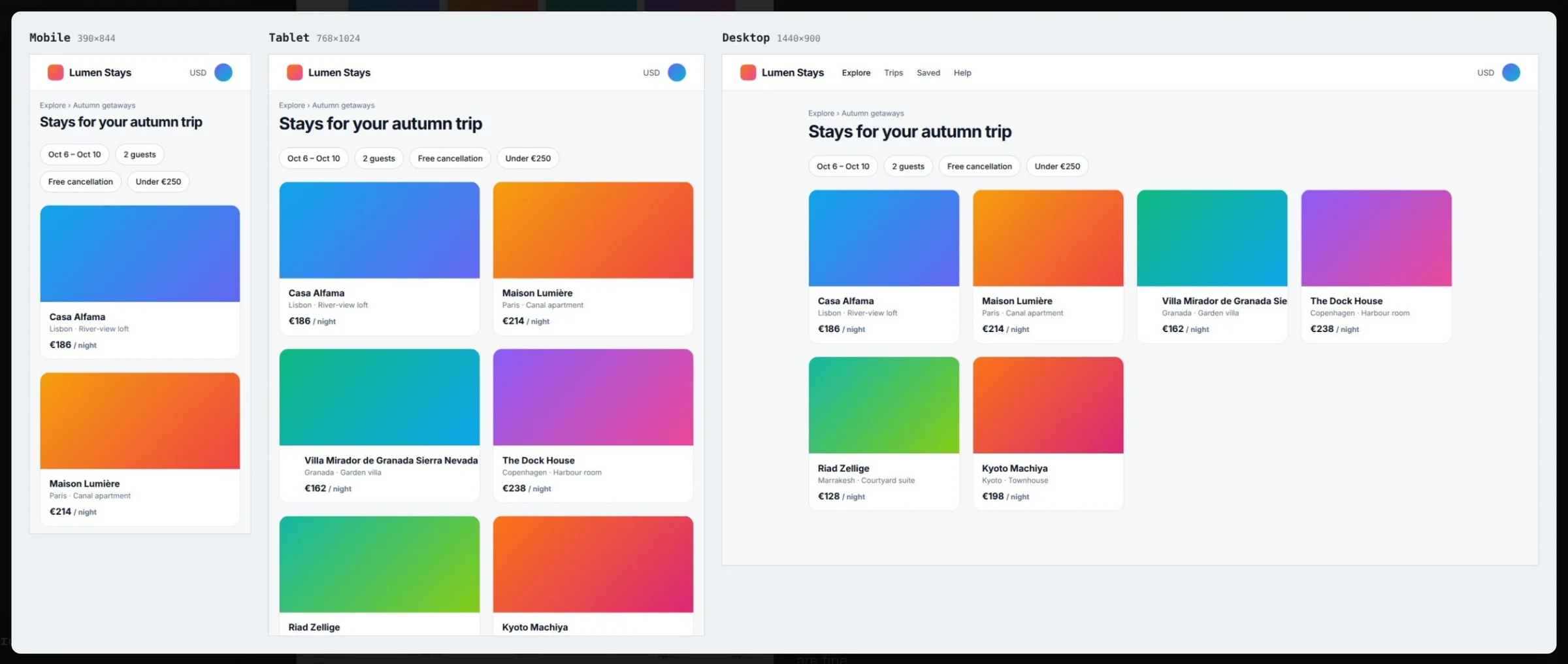
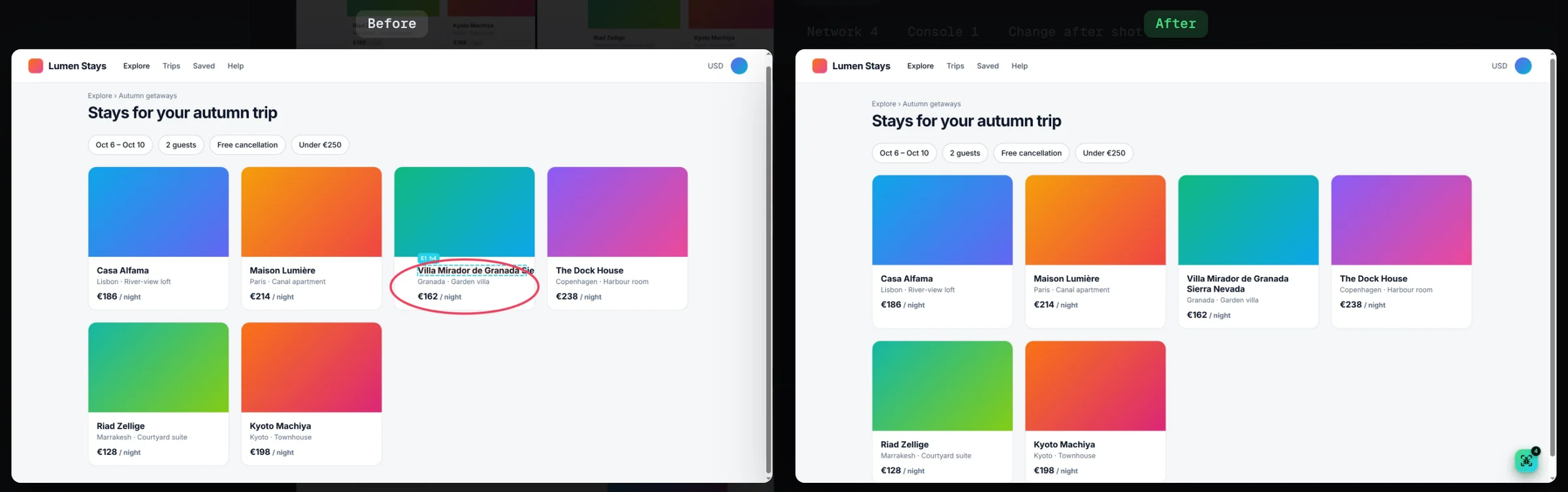
Close the loop with a before and after.
When a fix ships, add an “after” shot. Bugmark reopens the page at the same scroll position and captures it, or you can upload or paste one.
- Side by side in the dashboard, report and PDF
- Included as a Before | After table in GitHub issues
- Perfect for client sign-off
for-developers
DevTools-level detail, without asking for it.
Every capture keeps the last 150 requests and console messages from the page. Open any request to see exactly what was sent and what came back, then copy it as cURL or download a HAR file.
[redacted] before anything is saved.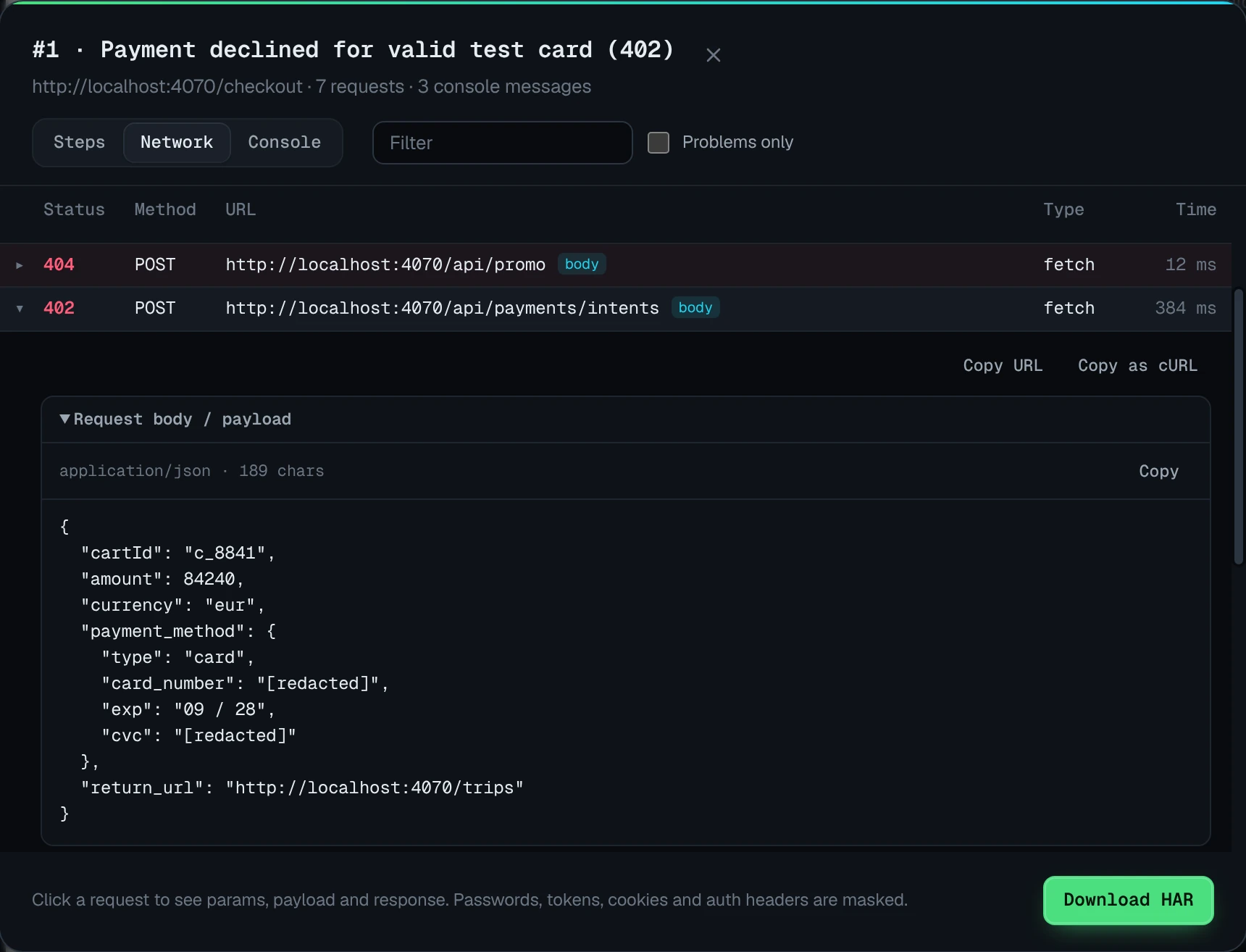
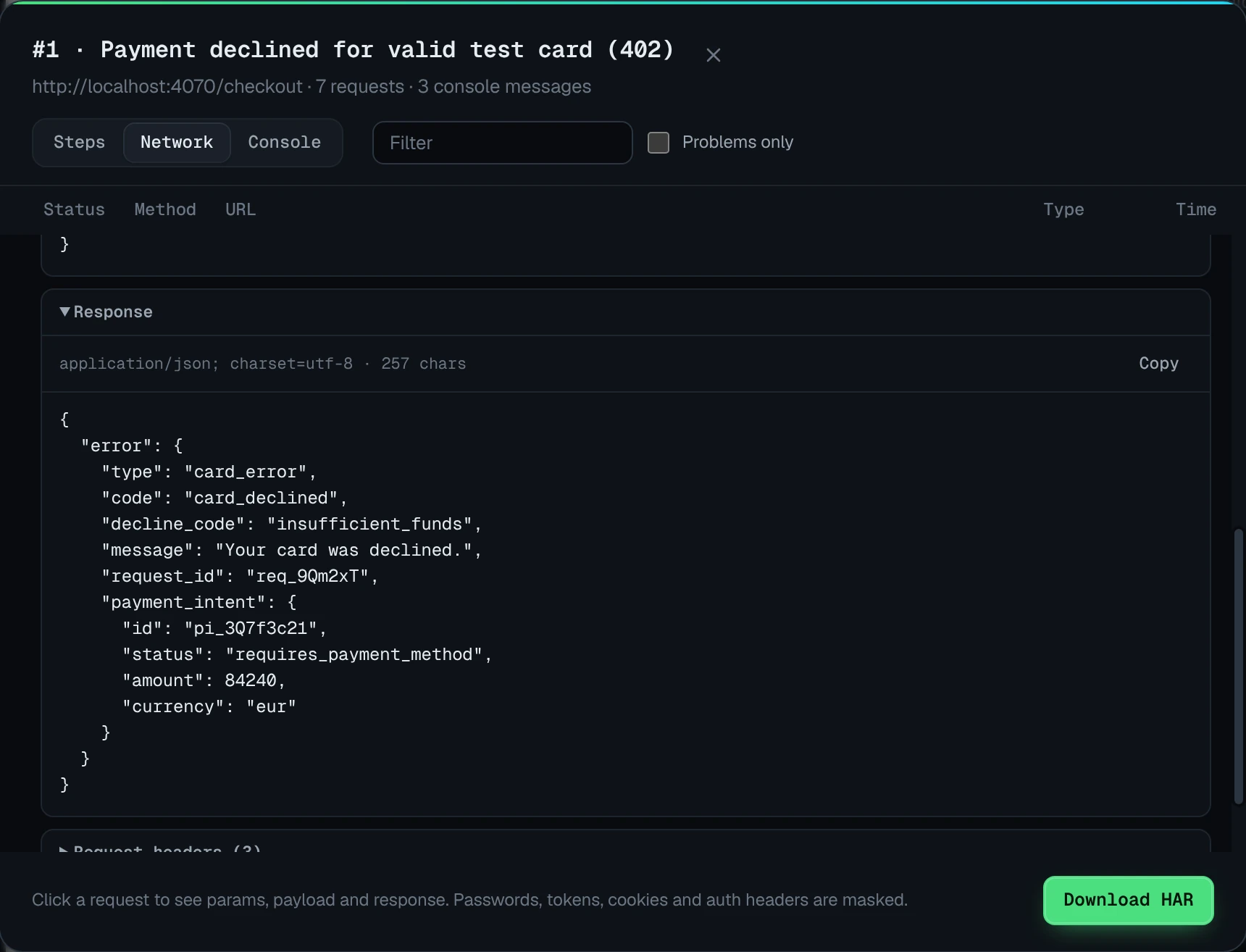
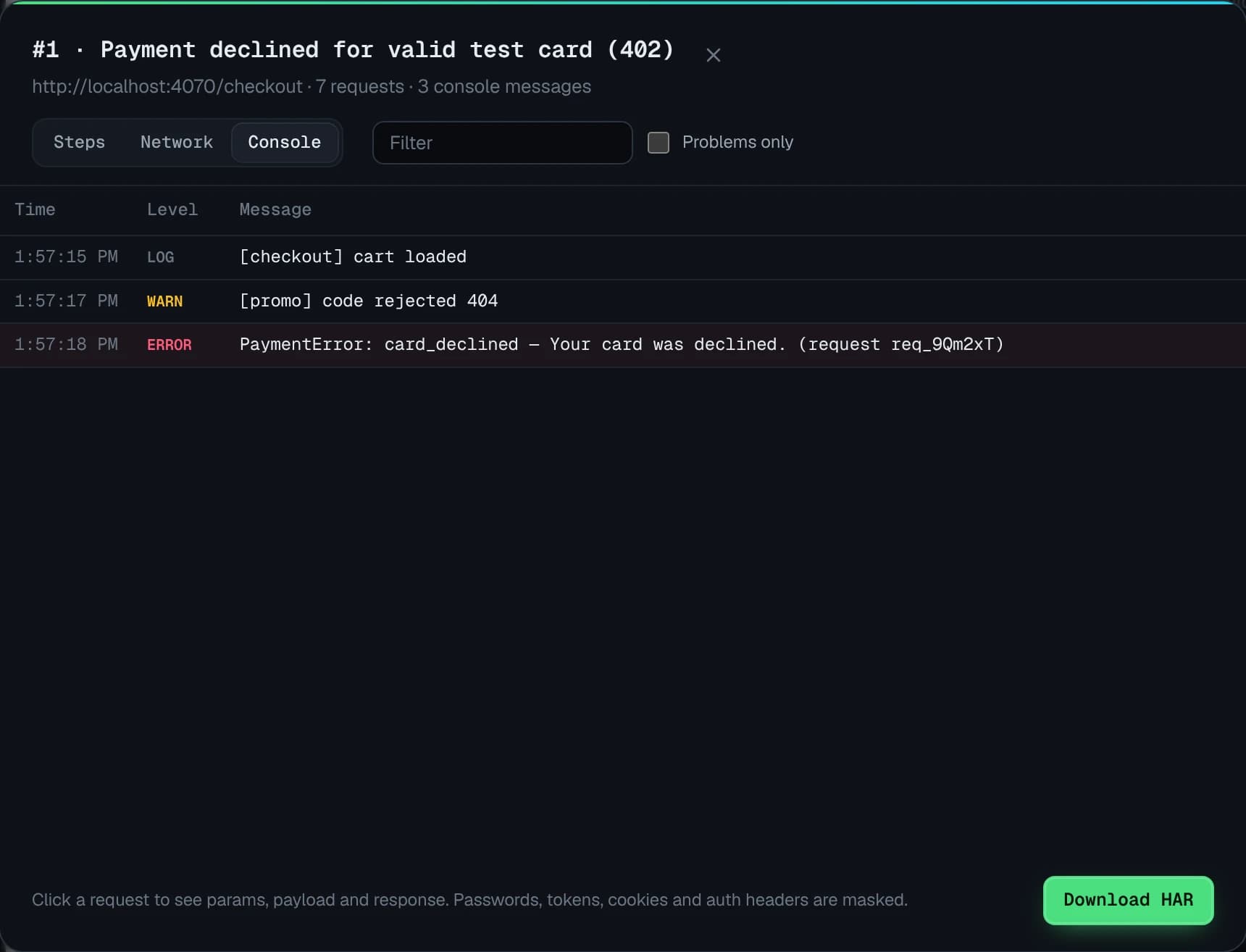
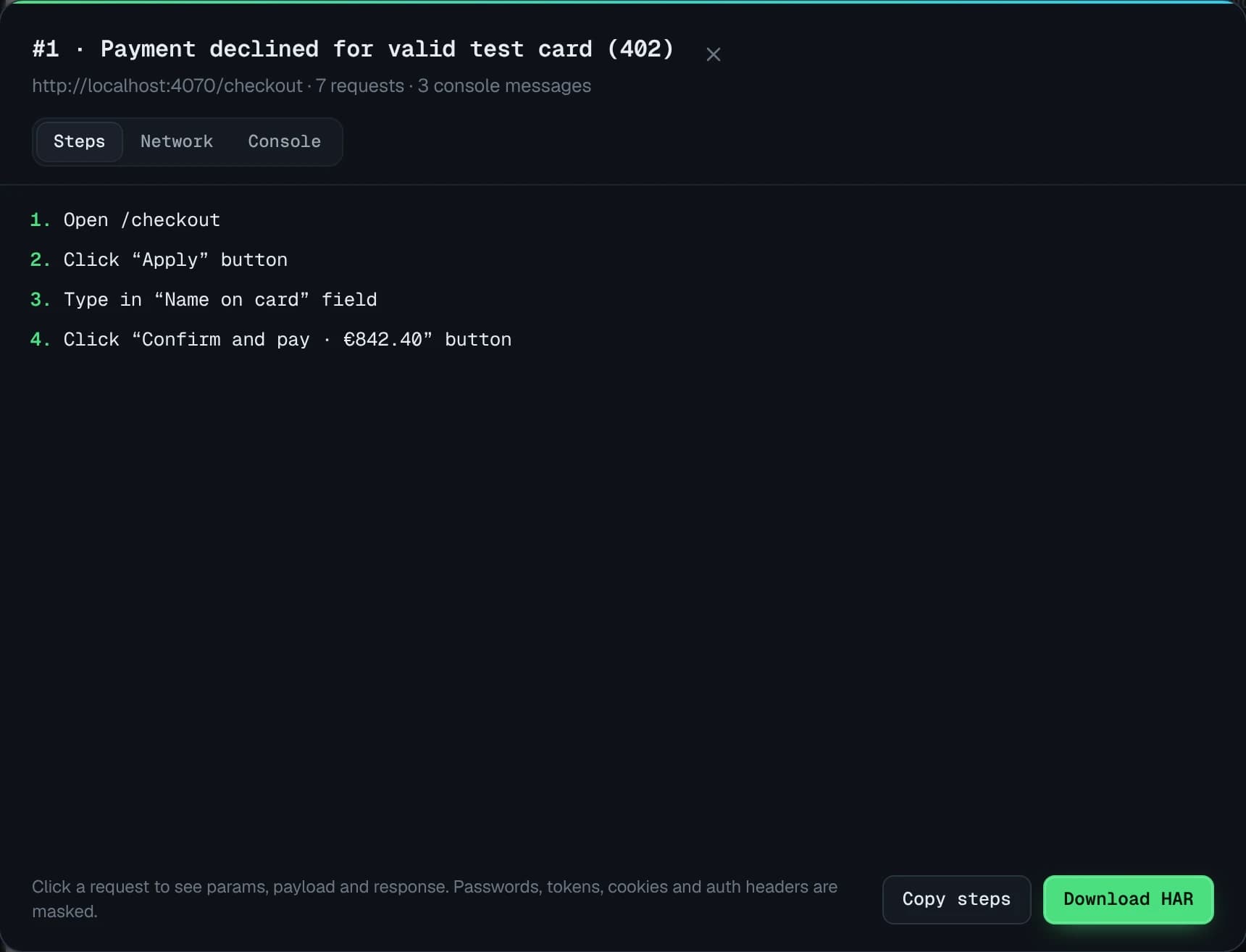
- Copy as cURL
- Download HAR
- Filter to failed requests
- 16 KB / 32 KB body limits
workflow
From “found it” to “fixed it” without the back-and-forth.
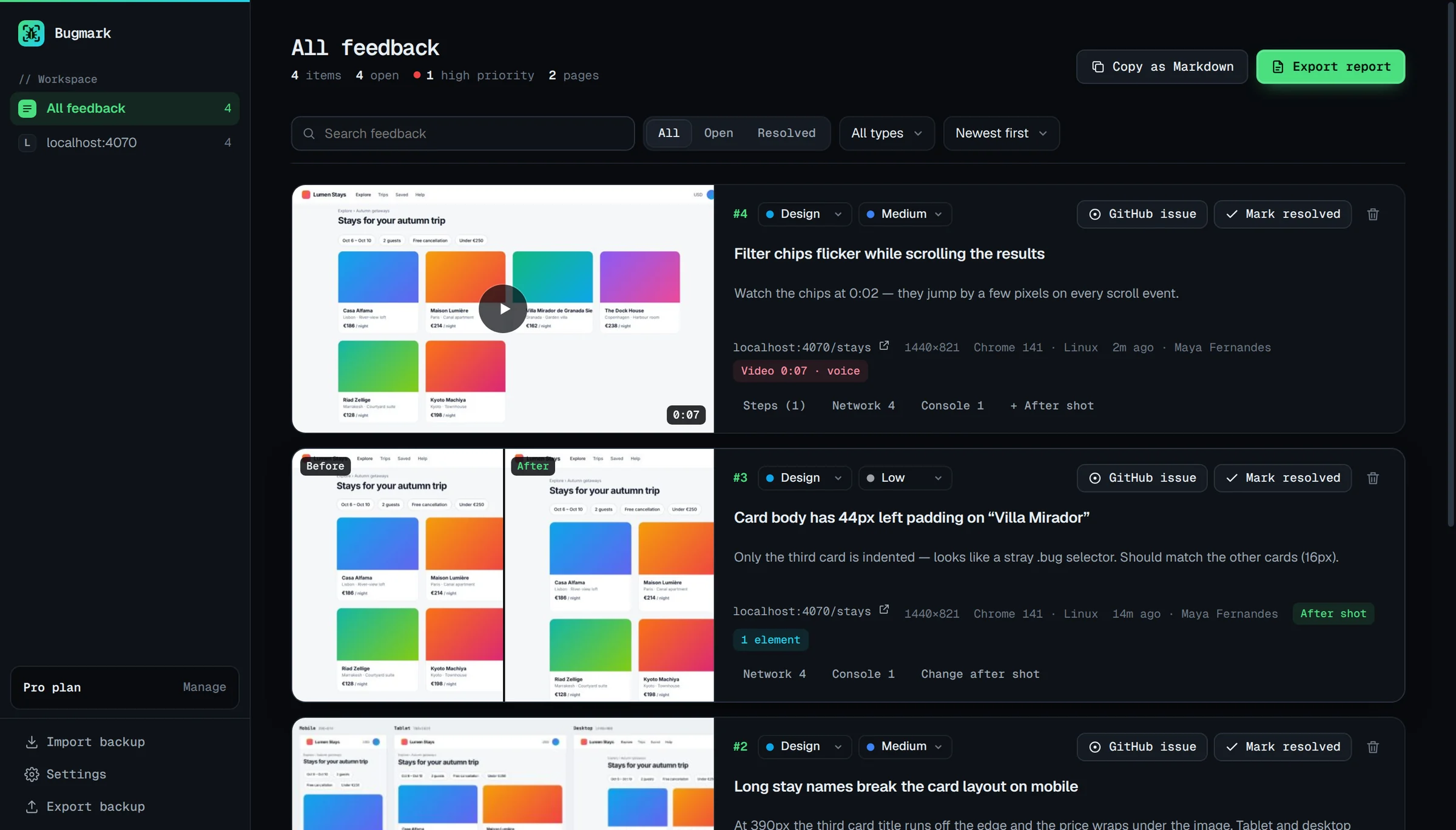
Triage everything in one dashboard, then send each issue where your team already works.
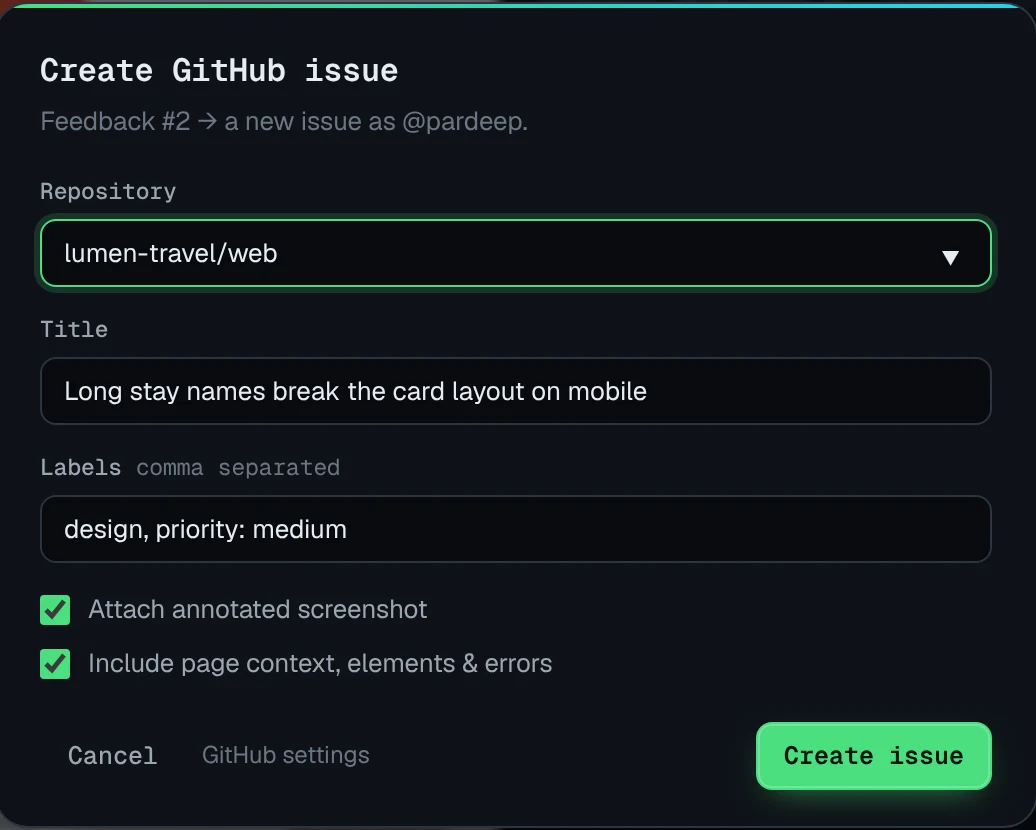
Create GitHub issues
Turn any capture into an issue with labels, the annotated screenshot, recording, steps and failing requests.
- Straight from the capture panel
- Fine-grained token, stored locally
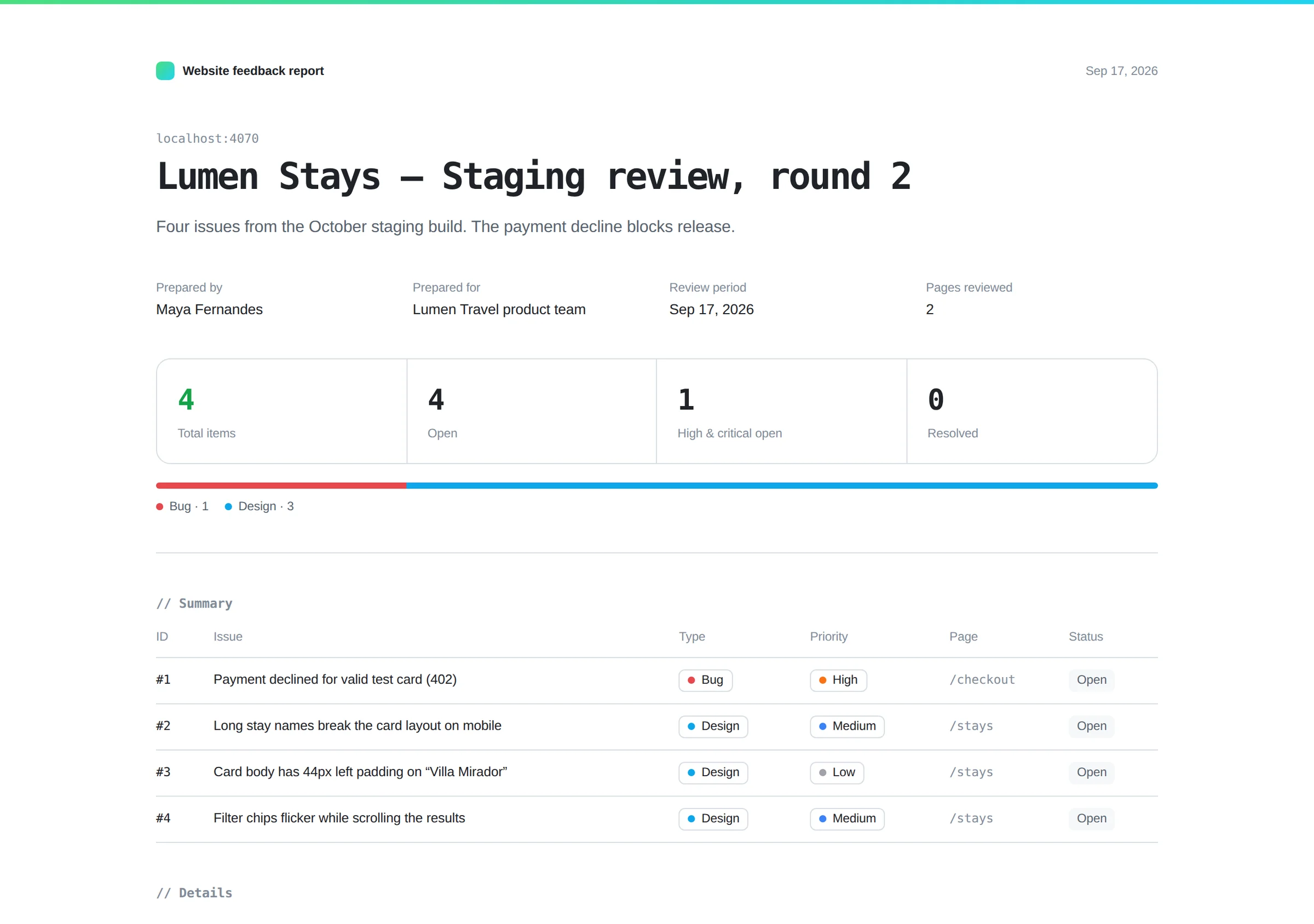
Share a polished report
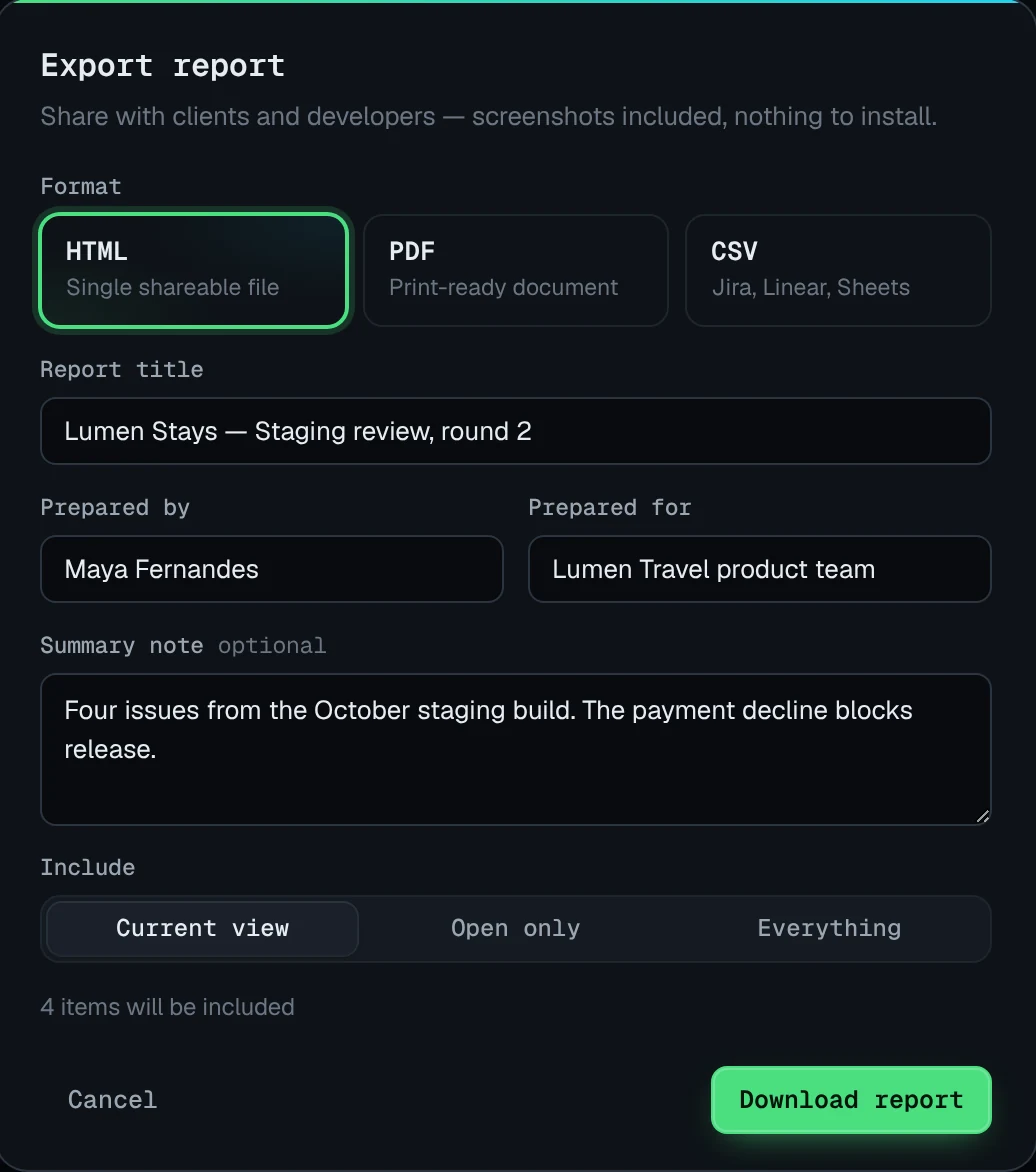
A single HTML file with a summary, an issue index and every screenshot. Opens anywhere, prints to PDF.
- Recordings embedded
- White-label with your logo
Export for any tracker
CSV for Jira, Linear or Sheets, Markdown for Slack, and a HAR file for any request log.
- HTML · PDF · CSV · Markdown
- Backups include recordings
everything-else
The details that make it fast.
Small things you’ll use on every review, all built into one lightweight extension.
Full-page capture
Scroll-and-stitch whole pages, including apps that scroll inside a panel.
Delayed capture
A 3-second timer for hover states, menus and tooltips.
Element inspector
Attach the CSS selector, size and computed styles of any element.
Redaction
Pixelate personal data on screenshots before they’re saved.
Secret masking
Tokens, passwords and card numbers are masked in network logs.
Copy as cURL & HAR
Replay a failing request in your terminal or open it in DevTools.
White-label reports
Your logo, colours and company name. No Bugmark footer.
Keyboard first
⌥⇧S to annotate, ⌥⇧R to record, Enter to capture, ⌘↵ to save.
Backup & restore
Move everything to another computer, recordings included.
Free to try, no account
Install and go — every feature works right away. Unlock unlimited use with a one-time $7.99 payment.
who-it's-for
Made for people who ship websites.
Whether you’re reviewing one landing page or a 200-page redesign, the workflow stays the same.
Agencies & studios
Run structured client reviews, send branded reports, and get sign-off before launch — without adding seats to another tool.
Freelancers
Look professional from the first round of revisions. One tidy report replaces a dozen emails and screenshots.
QA & dev teams
File reproducible bugs with steps, payloads, responses and console errors, straight into GitHub issues.
Marketing & content
Review landing pages and copy changes on staging, pin every tweak, and hand developers a clear list.
private-by-design
Your client’s website stays your business.
Reviews happen on unreleased staging sites full of real data. Bugmark is local-first: nothing is uploaded unless you export a report or create an issue.
Stored on your device
Screenshots, recordings and network logs live in your browser’s local storage. We don’t run servers that receive them.
Secrets masked automatically
Passwords, tokens, API keys, card numbers and auth headers become [redacted] before a request is saved.
No account required
Install and start capturing — it’s free. GitHub tokens never leave your browser.
pricing
Try it free. Own it for $7.99.
Every feature is unlocked from the first install. Free covers a couple of reports so you can try the whole workflow; one $7.99 payment removes the limit for good — no subscription, no seats.
Free
to tryEvery feature, on up to 2 saved reports at a time. No account, no credit card.
Add to ChromePro
one-timeUnlimited reports and every feature, forever. One payment — no subscription, no renewals.
Get Bugmark ProEvery feature is included in both — Pro just removes the limit
capture
- Annotate, pin, label & redact
- Visible, full-page, delayed & element captures
- Mobile · tablet · desktop in one shot
- Screen recording with voice
- Before / after shots
debug
- Steps to reproduce, recorded for you
- Console logs & JavaScript errors
- Network requests with payloads & responses
- Element inspector with CSS selectors
- Copy as cURL & HAR export
share
- GitHub issues with screenshots, video & logs
- HTML, PDF, CSV & Markdown export
- White-label reports with your logo
- GitHub issues from a capture
- Backup & restore
Chrome · Edge · Brave · Arc · Your captures stay on your device
faq
Questions, answered.
Everything you need to know before you install — capture, privacy, pricing and browser support.
01How much does Bugmark cost?
Bugmark is free to try — every feature is unlocked, including screenshots and annotation, screen recording, console and network logs, steps to reproduce, GitHub issues and exports. The free version keeps up to 2 saved reports at a time. A one-time $7.99 payment (no subscription) removes the limit for unlimited reports, forever. No account is needed to start.
02How do I install Bugmark?
Click Add to Chrome to open the Chrome Web Store listing, then click Add to Chrome and confirm. It takes a few seconds — no account or sign-up required. It also works in Edge, Brave and Arc.
03Which browsers does Bugmark work in?
Google Chrome and most Chromium-based browsers that support Chrome extensions, such as Microsoft Edge, Brave and Arc.
04What exactly does Bugmark record from the page?
At capture time it keeps the last 150 network requests (method, URL, status, timing, and for fetch/XHR calls the query params, headers, request payload and response body) plus the last 150 console messages, your recent clicks and page changes as steps to reproduce, and the URL, browser, OS and viewport. Request bodies are capped at 16 KB and responses at 32 KB. You can turn payload recording off in Settings.
05Is it safe to capture network data on a production app?
Bugmark masks passwords, tokens, API keys, session IDs, card numbers and Authorization/Cookie headers with [redacted] before anything is saved, in JSON, form fields and URLs. It never stores what you type into fields for the steps. Everything stays on your device until you choose to export or send it. Values a server echoes back inside free text can’t be detected, so review a report before sharing it outside your team.
06How do GitHub issues work?
Connect a fine-grained GitHub token in Settings (Issues and Contents read & write). Bugmark creates the issue from your browser with labels, steps, failing requests and console errors. Screenshots, recordings and HAR files are committed to a separate bugmark-assets branch so they display inside the issue. Your token is stored only in your browser.
07Can I record video with my voice?
Yes. Start a recording from the capture menu, the toolbar popup or ⌥⇧R. Allow the microphone once to narrate. Recordings are up to 5 minutes, continue across page loads, play back in the report and can be attached to GitHub issues.
08Is Bugmark a replacement for Chrome DevTools?
No — it complements DevTools. DevTools is where you debug; Bugmark captures the evidence at the moment a bug happens (screenshot or video, console, network payloads and steps) and packages it into a report or GitHub issue someone else can act on. See how it fits with other web developer tools.
09Do my clients or teammates need to install anything?
No. Reports export as a single self-contained HTML file that opens in any modern browser — screenshots included. You can also export PDF, CSV or Markdown for GitHub, Jira or Linear.
10Where are my screenshots stored?
Locally, in your browser’s storage on your computer, including recordings and network logs. Bugmark doesn’t upload your captures to our servers. Data only leaves your device when you export a report or create a GitHub issue. You can export a backup at any time to move to another machine.
11Does it work on localhost, staging and password-protected sites?
Yes. Bugmark captures exactly what you see in your tab, so it works anywhere you can open the page — including localhost, staging environments and apps behind a login.
explore
Learn more about bug reporting & debugging
- A free bug reporting tool that captures what developers need
- Web developer tools that bring DevTools context into every bug report
- A browser debugging tool for the bugs you can’t reproduce
- A website feedback tool for agencies, freelancers and client reviews
- A screen recorder for bug reports, with the logs attached
- A screenshot annotation tool that works on the live page
- A network request logger that attaches API traffic to bug reports
- A QA testing tool that makes manual bug reporting faster
- The best bug reporting tools in 2026, compared honestly
- How to write a bug report developers can actually fix
- How to capture a HAR file in Chrome
- How to capture console logs in Chrome
- Steps to reproduce template and examples
- How to take a full page screenshot in Chrome
- How to report a bug on a website (no technical skills needed)
- How to copy a request as cURL in Chrome
- How to screen record in Chrome on any computer
- Jam alternative: Bugmark vs Jam for bug reports
- Marker.io alternative: Bugmark vs Marker.io
- BugHerd alternative: Bugmark vs BugHerd for website feedback
- Loom alternative for bug reports: Bugmark vs Loom
- Userback alternative: Bugmark vs Userback for bug reports
- BetterBugs alternative: Bugmark vs BetterBugs
- Usersnap alternative: Bugmark vs Usersnap for bug reporting
Stop describing bugs. Send the evidence.
Install Bugmark in seconds and file your first reproducible bug report today. Free to try, every feature unlocked — $7.99 one-time to remove the limit.