guide
How to report a bug on a website (no technical skills needed)
You found something broken on a website and want it fixed. You do not need to know any code to write a report that gets acted on. This guide covers the quick checks to do first, the six things every report needs, a plain-English template you can paste into an email, and who to send it to.
Quick answer
How to report a bug on a website
First reload the page and try again in an Incognito window to rule out your browser. Then send the site owner a message with: the page URL, what you did step by step, what you expected, what happened instead, a screenshot or short recording, and your browser and device. Send one message per problem.
Before you report: five quick checks
A couple of minutes of checking saves a lot of back and forth. These checks tell you, and the person fixing it, whether the problem is in the website or only on your machine.
- Reload without the cache. Press Ctrl+Shift+R on Windows, Linux or ChromeOS, or Cmd+Shift+R on Mac. Old cached files after a website update are a common cause of odd behavior.
- Try an Incognito window. Press Ctrl+Shift+N (Cmd+Shift+N on Mac) and repeat what you did. Incognito runs without your cookies and, by default, without most extensions. If the bug disappears, mention that in your report.
- Try another browser or device. Edge, Firefox, Safari or your phone. "Only happens in Chrome" is a very useful clue.
- Check your Chrome version. Open the three-dot menu, then Help > About Google Chrome. Install any pending update, relaunch and test again. Note the version number for your report.
- Check for known outages. Many services have a status page (often status.companyname.com) or post updates on social media. If the whole site is down, a report is not needed.
If the problem is still there after these checks, it is almost certainly worth reporting. Write down what you tried, because "same problem in Incognito and Edge" saves the developer from asking.
What to include in a website bug report
Developers need to see the bug happen before they can fix it. Everything below helps them do that without coming back to you with questions.
| Include | How to get it | Example |
|---|---|---|
| The exact page | Click the address bar and copy the full URL | https://shop.example.com/checkout |
| What you did | List your clicks and entries in order | 1. Added hoodie to cart 2. Clicked Checkout 3. Clicked Pay now |
| What you expected | One sentence | The payment page should open |
| What happened instead | Describe it and copy any error text word for word | Button greyed out, then nothing happened |
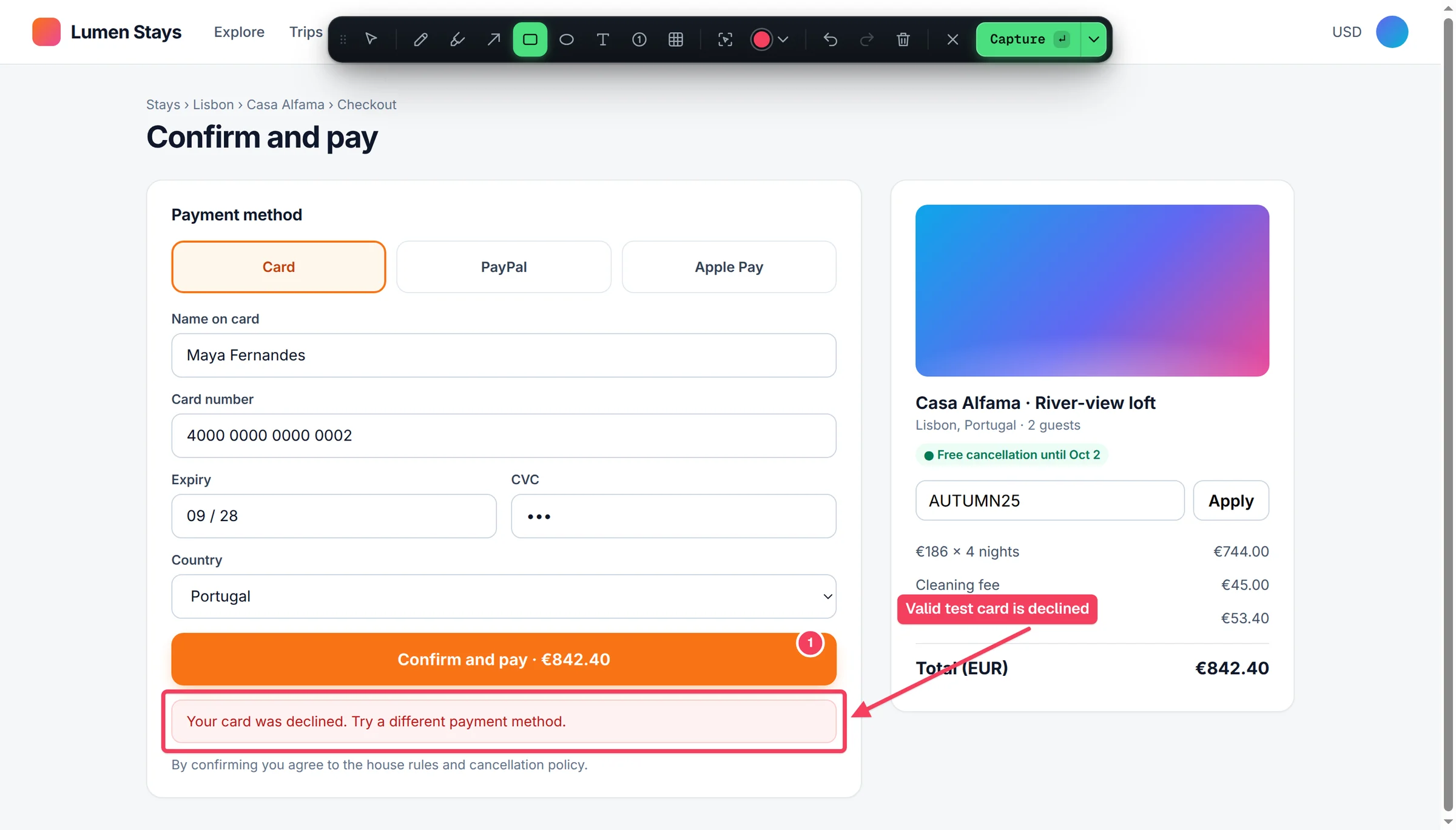
| A picture or video | Screenshot with the problem circled, or a short recording | Screenshot with an arrow pointing at the button |
| Your setup | Browser and version, device, and whether you were logged in | Chrome 156, Windows 11, logged in |
Two extras make a report much stronger: how often it happens ("every time" or "2 out of 5 tries") and when it happened, with your time zone. The time lets developers find matching entries in their server logs.
Need a screenshot of a long page? See how to take a full page screenshot in Chrome. If the bug involves movement, like a menu that flickers or a form that resets, a short video is clearer, and how to screen record in Chrome shows the built-in options on every computer.
How to report a bug on a website, step by step
- Make it happen again. Go back to the page and repeat what you did, slowly. Notice exactly which click or entry triggers the problem.
- Capture it. Take a screenshot at the moment it goes wrong and draw a circle or arrow on the problem. For anything that moves or takes several steps, record a 10 to 30 second video instead.
- Copy the URL. Click the address bar, select everything and copy it. "The checkout page" could mean several different pages.
- Write what you did as numbered steps. Use the words you see on screen: "Clicked Pay now", not "clicked the button".
- Write expected and actual results on separate lines. If an error message appeared, copy the text exactly or include it in the screenshot.
- Add your browser, device and the time. Plus anything you already tried, such as Incognito or another browser.
- Give it a clear subject line. Say where and what: "Pay now button does nothing on checkout", not "Website broken!!".
- Send it to the right place (see below) and keep one problem per message.
A plain-English bug report template
Copy this into an email, a support form, Slack or a project tool. It works for clients reporting to an agency, staff reporting to an internal team, and customers reporting to a company.
Subject: [Bug] "Pay now" button does nothing on the checkout page

Where: https://shop.example.com/checkout
When: Today, 14:32 (UK time)

What I did:
1. Added the blue hoodie (size M) to the cart.
2. Went to Checkout and filled in the delivery form.
3. Clicked "Pay now".

What I expected:
The payment page to open.

What happened instead:
The button greyed out for a second, then nothing happened.
No error message was shown. I tried 3 times with the same result.

How often: Every time (3 of 3)
My setup: Chrome 156 on Windows 11, laptop screen, logged in as jane@example.com
Also tried: Incognito window (same problem), Edge (same problem)

Attached: screenshot with the button circled, 20-second screen recording
If you are reporting into a developer tool such as GitHub, Jira or Linear, use the fuller bug report template, which adds fields like severity and console errors. For tricky bugs, our steps to reproduce template shows how to write steps anyone can follow.
Where to send your bug report
| Your situation | Where to report it |
|---|---|
| You are a client and an agency or freelancer built the site | The feedback channel they gave you: a project board, shared tracker or email thread. Ask if unsure. |
| You use an online service or app | The in-app help or chat button, the support page, or the support email in the footer |
| You work for the company | Your internal bug tracker or the team channel for that product |
| It is an open-source project | The project's GitHub or GitLab issues page, after searching for an existing report |
| It is a security or privacy problem | Privately, never in public. Look for a security page or /.well-known/security.txt on the site |
| You cannot find any contact | The site's contact form, or the email in its privacy policy or legal notice |
Security bugs are different
If you can see other people's data, change prices, or log in as someone else, do not post details in public reviews, social media or open issue trackers. Report privately to the site owner, include only what you saw, and do not keep testing the weakness.
Tips for clients, PMs and QA testers
- One problem per report. Five issues in one email turn into one ticket that never closes. Separate reports can be fixed and confirmed one at a time.
- Separate bugs from change requests. "The button does nothing" is a bug. "Make the button green" is a change. Label them so the team can prioritize.
- Say how much it matters. "Customers cannot pay" and "a typo on the About page" need very different urgency. Describe the impact rather than writing "URGENT".
- Name the device for layout problems. Something that looks broken on your phone may be fine on a laptop. Mention the phone model or window size.
- Leave out passwords. Write "logged in as my admin account" instead of sharing credentials, and blur personal or payment details in screenshots.
- Reply when it is fixed. A quick "confirmed fixed" or "still happening" closes the loop and keeps the tracker accurate.
Collecting feedback from several reviewers on a whole site? Our website feedback tool page covers that workflow.
The faster way: Bugmark
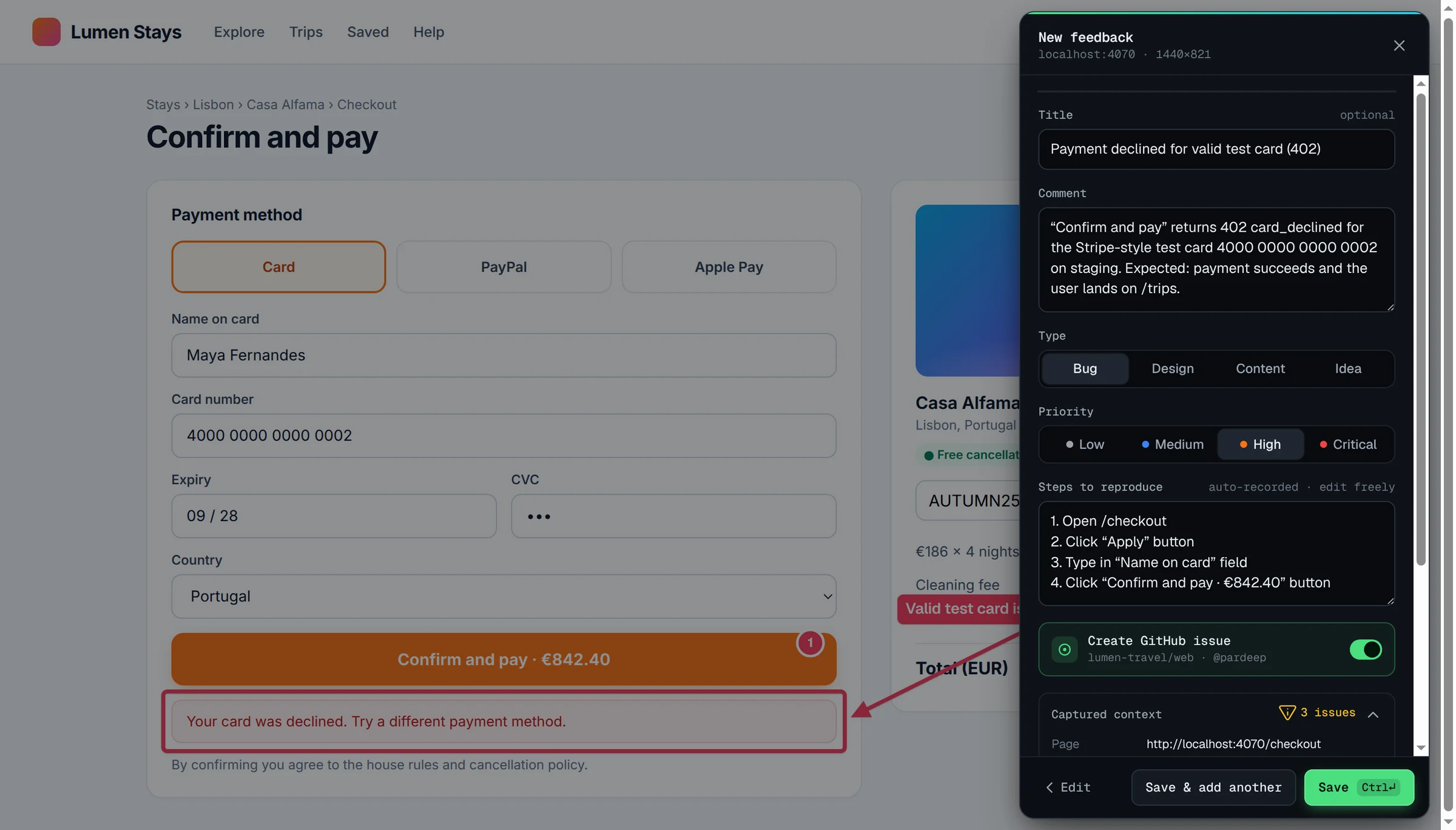
The manual method works, but non-technical reporters rarely remember every detail, and developers usually need more than a screenshot. Bugmark is a Chrome extension that gathers the details automatically when you capture a bug.
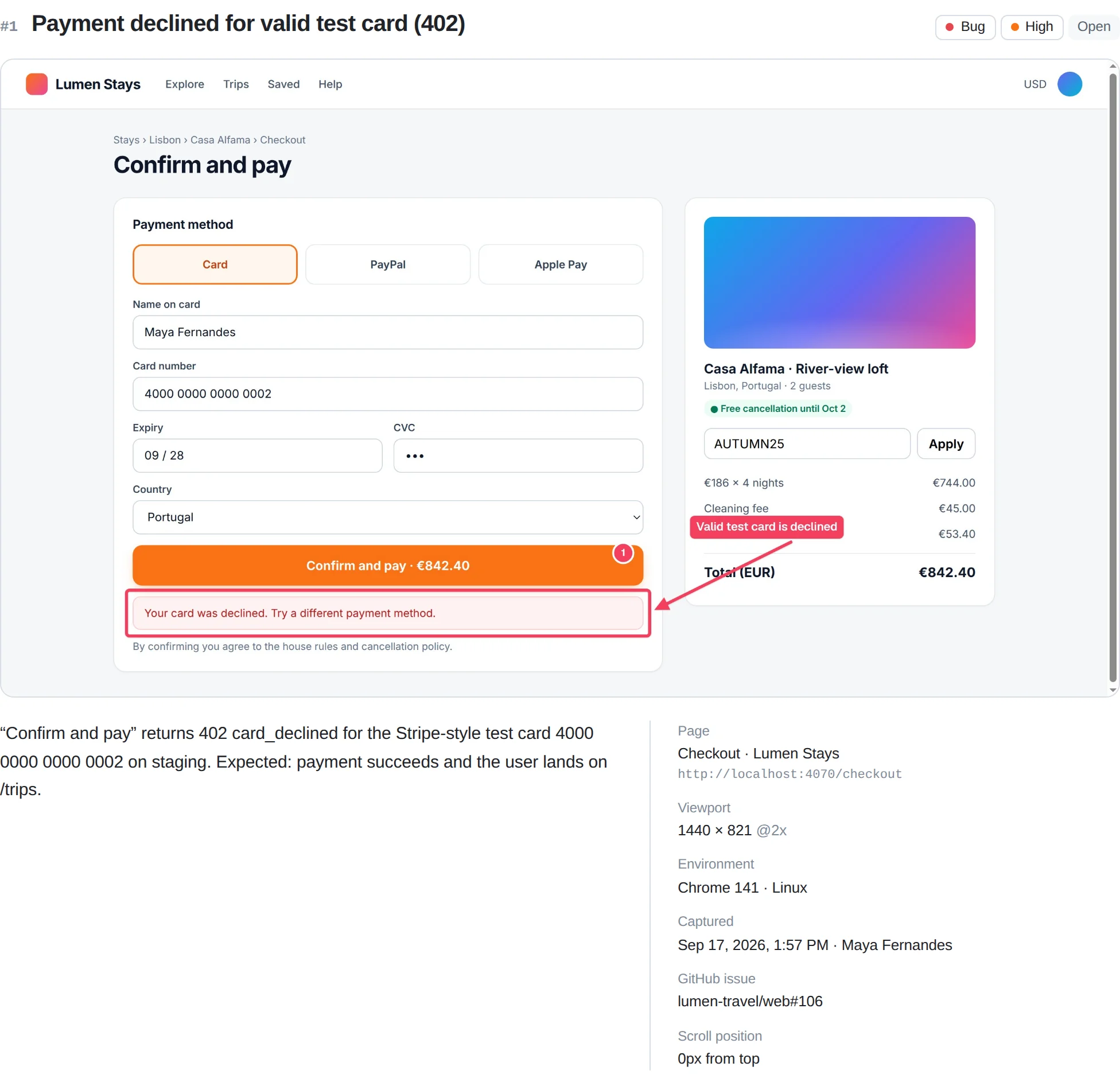
- Annotated screenshot or recording: arrows, boxes, numbered pins, text and a redact tool, or a tab recording with voice narration up to 5 minutes.
- Steps to reproduce, recorded automatically: the last 30 actions in the tab (clicks with element labels, which fields were typed in but never the text). You can edit them before saving.
- The technical part, handled for you: the last 150 console messages and the last 150 network requests are attached, with passwords, tokens and cookies masked as
[redacted]. - Environment: URL, page title, browser, OS, viewport, pixel ratio and scroll position.
- Easy to send: export a self-contained HTML report that opens in any browser, PDF, CSV or Markdown, or create a GitHub issue directly.
Bugmark is free to try with every feature unlocked: the free version keeps up to 2 saved reports at a time, and a one-time $15 payment removes the limit. No subscription and no account, and captures stay in your browser. Add Bugmark to Chrome
How to report a bug on a website
- 1
Rule out your browser
Reload without the cache and try again in an Incognito window or another browser.
- 2
Reproduce the bug
Repeat what you did slowly and note exactly which action triggers the problem.
- 3
Capture it
Take an annotated screenshot or record a short video of the problem happening.
- 4
Copy the URL
Copy the full address of the page from the address bar.
- 5
Write the steps
List what you did as numbered steps using the labels shown on screen.
- 6
Describe expected and actual results
Say what should have happened and what happened instead, copying any error text exactly.
- 7
Add your setup
Include your browser and version, device, the time it happened and anything you already tried.
- 8
Send it to the right place
Send one report per problem to the site owner's support or feedback channel, privately for security issues.
Frequently asked questions
How do I report a bug on a website if I am not technical?
Send the site owner a short message with the page URL, the steps you took, what you expected, what happened instead, a screenshot or short recording, and your browser and device. You do not need to understand the cause. Clear, specific details are what developers need to find and fix the problem.
Who do I report a website bug to?
Report it to whoever runs the site. For a service you use, try the in-app help button, the support page or the support email in the footer. Clients should use the channel their agency set up. Open-source projects usually accept reports on GitHub. Security problems should always be reported privately.
How do I find my browser version for a bug report?
In Chrome, click the three-dot menu at the top right, then Help and About Google Chrome. The version number appears under the Google Chrome heading. Include it with your operating system, such as Windows 11 or macOS, and the device you used.
Should I include a screenshot or a video?
Use a screenshot for problems you can see in a single moment, such as a wrong price, broken layout or error message, and circle the problem. Use a short video for anything involving movement or several steps, such as a menu that flickers or a form that resets after you click submit.
What if the bug only happened once?
Report it anyway and say it happened once. Include the exact time and time zone, the URL, what you were doing and any error text you saw. Developers can often match the time to their server logs. Mention whether you tried again and what happened.
Try Bugmark free — no account needed
- Screenshots & screen recording
- Console & network logs
- Steps to reproduce
- GitHub issues & reports