website feedback tool
A website feedback tool for agencies, freelancers and client reviews
Client feedback on a website usually arrives as an email thread with screenshots named “image (3).png”. Bugmark lets reviewers pin numbered comments directly on the live page and gives you a branded report with every note, screenshot and technical detail in one place.
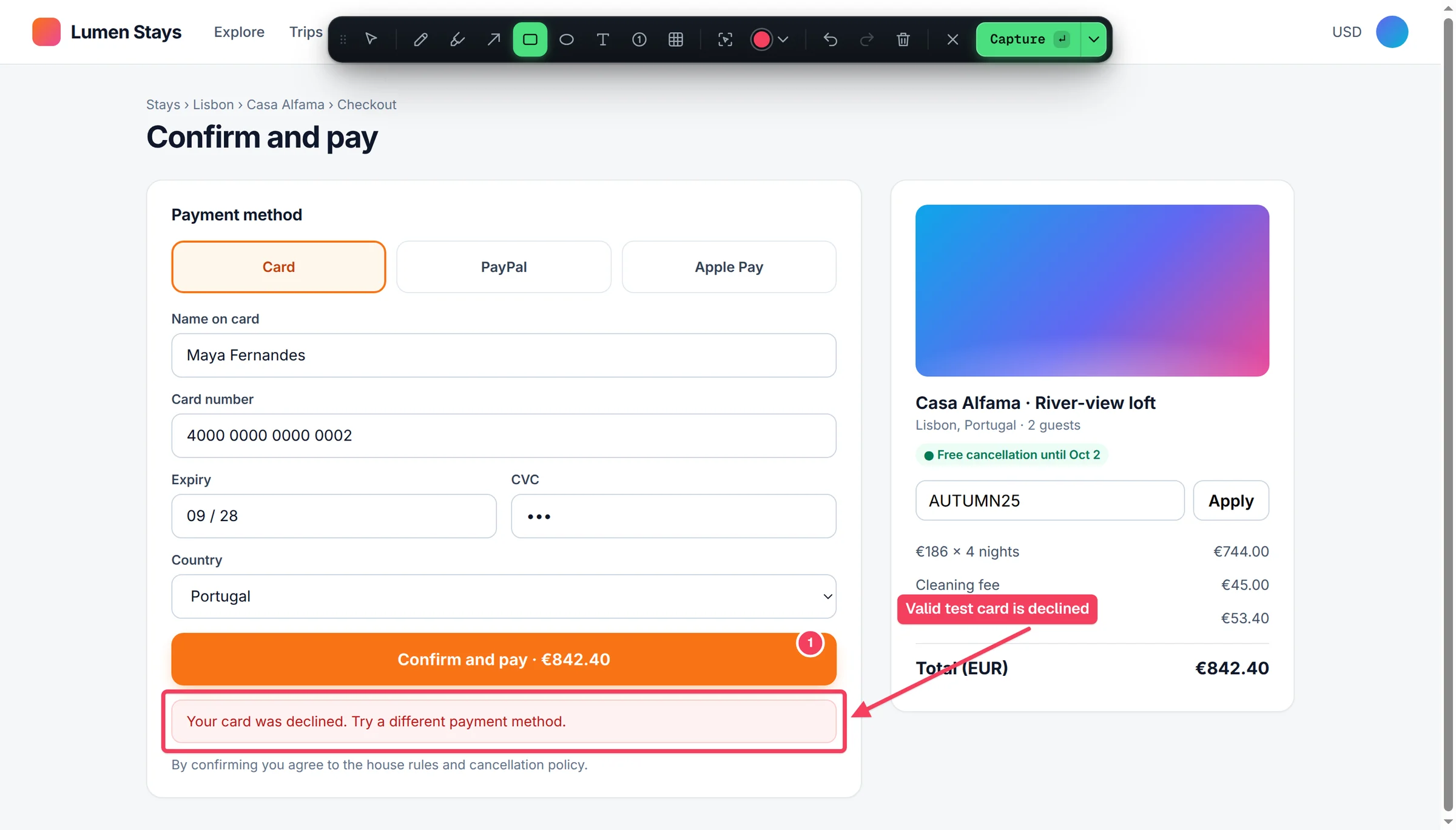
Why website reviews stall
The last two weeks before a launch are where agency projects lose time. Feedback is spread across email, chat and a shared document. “The button on the about page is weird” doesn't say which button, at what screen width, or what weird means. Half the comments are design preferences and half are real bugs, and nobody can tell which is which until a developer tries to reproduce each one.
Then there is version drift. A client comments on Monday's build, the team ships changes on Tuesday, and by Wednesday nobody is sure whether a comment refers to the old layout or the new one. Screenshots without URLs and dates make it worse, and each round of clarification pushes the launch back a little further.
A website feedback tool fixes this by tying every comment to a specific spot on a specific page, with enough context that the person implementing the change never has to ask a follow-up question.
Annotate the live page, not a mockup
Bugmark draws directly on the page in the browser. Reviewers can use numbered pins to reference several issues in one capture, arrows and rectangles to point at elements, text labels for short notes, a highlighter for copy changes, and a redact tool to pixelate customer data before sharing. “Interact with page” mode lets them open a dropdown or mobile menu first, and delayed capture (3 seconds) catches hover states and tooltips.
Every capture also records the page URL, viewport, browser and OS, so a comment about the header at tablet width is clearly a tablet-width issue. For design reviews, the element inspector attaches the computed font, color, padding and margin of whatever the reviewer clicks. The full set of markup options is on the screenshot annotation tool page.
Features agencies ask for
- Breakpoint captures — one click renders the page at 390×844, 768×1024 and 1440×900 side by side, so responsive feedback covers all three widths.
- Before/after — add an “after” screenshot to the original report (recaptured at the same scroll position, uploaded or pasted) to show the client exactly what changed.
- White-label reports — set your logo, accent color and company name on exported reports.
- Self-contained HTML report — one file with a summary, index and detail pages, screenshots and videos embedded. It opens in any browser without an account.
- PDF and CSV — print a PDF for sign-off, or export CSV to import into Jira, Linear or a spreadsheet.
- Dashboard grouped by site — keep feedback for each client project separate, filter by status and sort by priority.
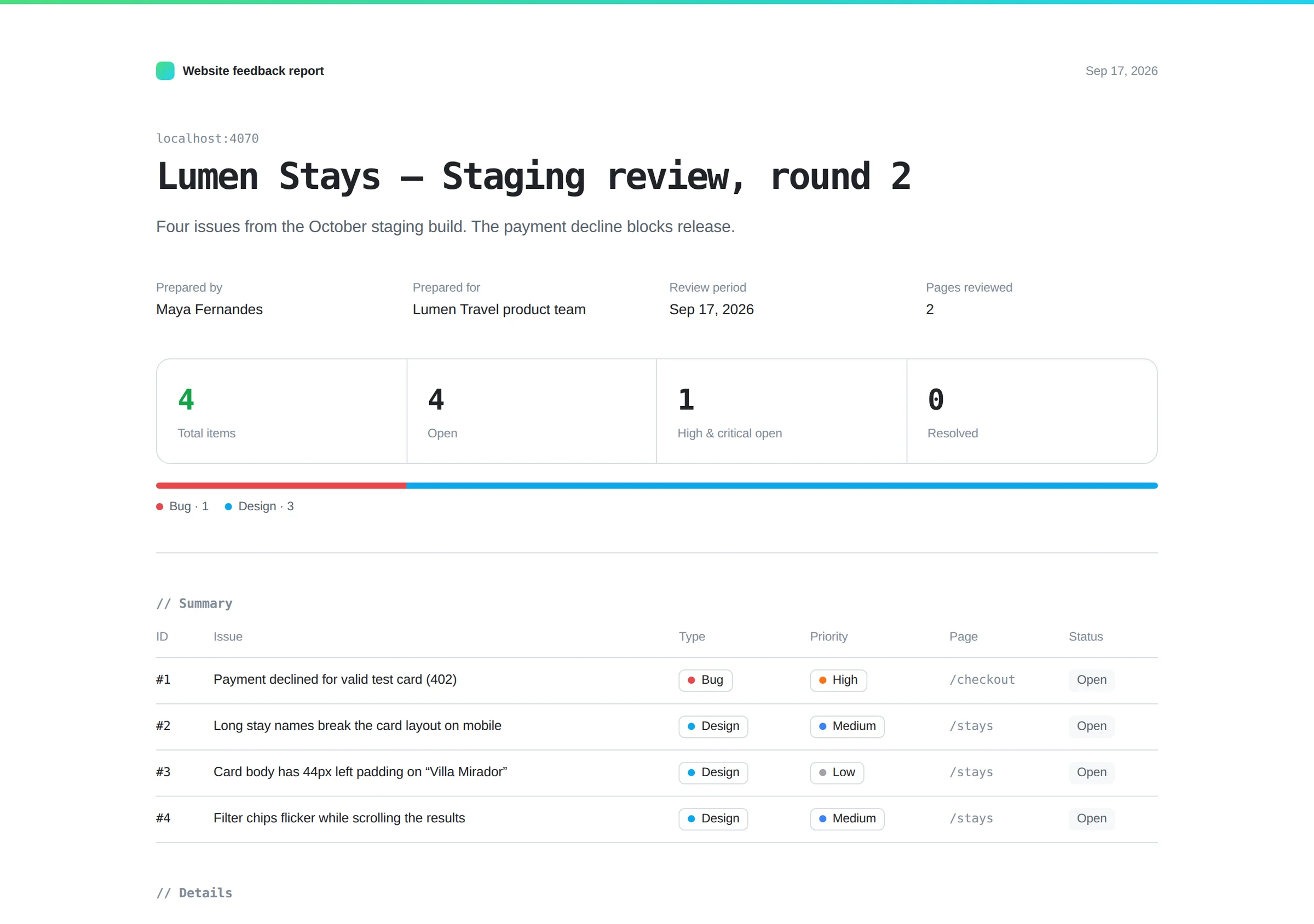
A client review round, step by step
- Send the client or internal reviewer the install page. Nobody needs to create an account.
- The reviewer walks through the staging site, pressing ⌥⇧S on each page with an issue and dropping numbered pins.
- They set a type and priority on each capture and save it to their dashboard.
- At the end of the session they export one white-label HTML report and send it to you.
- Your team works through the items, adds “after” screenshots, and returns the updated report for approval.
Because the technical context comes along automatically, the same report works for both audiences: the client sees annotated screenshots and comments, and your developers see console errors and failed requests for anything that turns out to be a real bug.
A practical tip for larger reviews: agree on types and priorities before the round starts. If the client marks copy changes, design tweaks and functional bugs with different types, your team can filter the dashboard or the CSV export and route each group to the right person on day one, instead of sorting fifty mixed comments by hand.
Trade-offs to know before you roll it out
Bugmark is an extension, so each reviewer installs it in Chrome or a Chromium browser (Edge, Brave, Arc); it does not work in Firefox or Safari, and there is no embeddable widget that site visitors can use without installing anything. There are no hosted share links or shared team workspace: feedback lives in each reviewer's browser until they export it, which means reports are passed around as files. If your process depends on clients commenting through a script on the site itself, compare BugHerd and Marker.io.
The upside of that design is privacy. Nothing is uploaded to Bugmark servers, which matters when you are reviewing unreleased client work or a site behind a login.
Who it suits
Freelancers and small agencies who want structured client feedback without adding another paid seat per reviewer. In-house marketing and design teams reviewing landing pages before a campaign. Product teams running a design QA pass on a new release. If most of your feedback comes from testers rather than clients, the bug reporting tool page covers that workflow.
Run your next review round with Bugmark
Free to try, no account, every feature including white-label reports unlocked; $7.99 one-time for unlimited reports. Add Bugmark to Chrome — free.
Frequently asked questions
What is a website feedback tool?
A website feedback tool lets reviewers leave comments tied to specific elements on a live web page, usually with annotated screenshots and technical details such as URL, browser and screen size. It replaces scattered emails and chat messages with structured, actionable items a designer or developer can work through.
How do I collect feedback from clients on a website?
Give clients a way to annotate the page directly rather than describing issues in email. With Bugmark, the client installs the free extension, pins comments on each page of the staging site, and exports a single HTML or PDF report. You can brand the report with your logo and colors.
Do clients need an account to leave feedback with Bugmark?
No. Bugmark has no sign-up. Clients install the extension in Chrome or another Chromium browser, capture and annotate pages, and export a report file to send back. The trade-off is that there is no hosted share link or shared workspace; feedback is exchanged as exported files.
Can I white-label website feedback reports?
Yes. Bugmark lets you set a logo, accent color and company name on exported reports. The HTML report is a single self-contained file with a summary, index and detail pages, and you can also print it to PDF for sign-off or export CSV for a project tracker.
Can I annotate a website at mobile and tablet sizes?
Yes. The Mobile · tablet · desktop capture mode uses Chrome device emulation to render the page at 390×844, 768×1024 and 1440×900 and combines them into one side-by-side image. This makes it easy to leave responsive feedback without resizing the browser window manually.
Try Bugmark free — no account needed
- Screenshots & screen recording
- Console & network logs
- Steps to reproduce
- GitHub issues & reports