userback alternative
Userback alternative: Bugmark vs Userback for bug reports
Userback is a user feedback platform: a website widget, a browser extension, surveys, session replay and a shared feedback inbox for product teams. Bugmark is a Chrome extension built only for bug reports developers can fix, with annotation, recording and developer context stored locally in your browser, and a one-time price instead of a subscription.
TL;DR
The short version
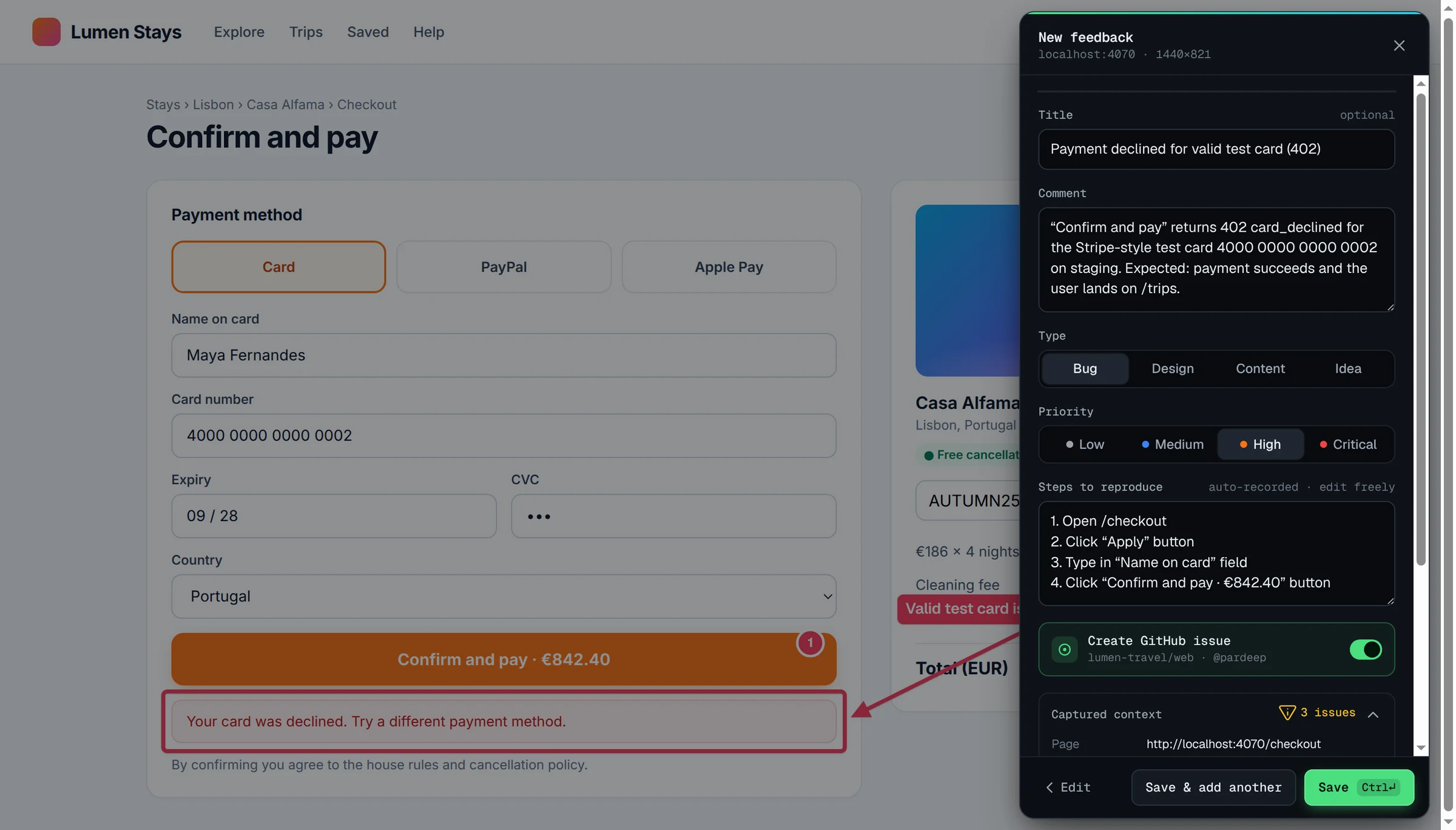
Choose Userback if you want to collect feedback from your own users through an embedded widget and surveys, manage it in a shared inbox with session replay, and sync it with Jira, ClickUp and other project tools. Choose Bugmark if the person reporting is your own developer, tester or designer and you want console logs, network payloads and responses, steps to reproduce, HAR download and GitHub issues on every capture, with no account, data kept on your device and a one-time $15 payment instead of a monthly plan.
When Userback is the better fit
Userback is designed to gather feedback from many people, including the customers using your product. You add a feedback widget to your site or app, or use its browser extension for Chrome, Firefox and Edge on any website, and every submission lands in a shared Userback account where your team can triage it, reply and follow up.
- End-user feedback: a customizable feedback widget, user surveys on Business and above, and a Feature Portal add-on for votes and feature requests. Reporters are unlimited on every plan, and people who submit feedback do not need a seat.
- Session replay and developer tools: on the Business plan and above, feedback includes a session replay plus console logs, network requests and custom data.
- Feedback management: a kanban board, inbox view, priorities, custom workflows and customer follow-up, with AI feedback insights and automation on higher plans.
- Integrations: Slack and Microsoft Teams notifications, project management integrations from the Team plan (including two-way sync with Jira and ClickUp), Zapier and MCP connectors, and webhooks and a REST API on Business Plus. Its integrations page also lists Linear, GitHub, GitLab, Asana, Trello and Azure DevOps.
Userback has a Free Forever plan with 2 seats, 2 feedback projects and unlimited feedback collection, although feedback is only viewable for 7 days on that plan. Paid Team, Business and Business Plus plans are billed monthly or annually; at the time of writing, Team starts at $29 per month billed annually with 5 seats, and Business adds unlimited seats.
When Bugmark is the better fit
Bugmark is for the people who reproduce bugs themselves — developers, QA testers, designers and freelancers — and want every report to carry the technical detail needed to fix it, without a workspace, a seat count or a recurring bill.
- Simple pricing: every feature is unlocked from the first install. The free version keeps up to 2 saved reports at a time, and a one-time $15 payment (Bugmark Pro) removes the limit for unlimited reports, forever. No subscription, no seats and no account.
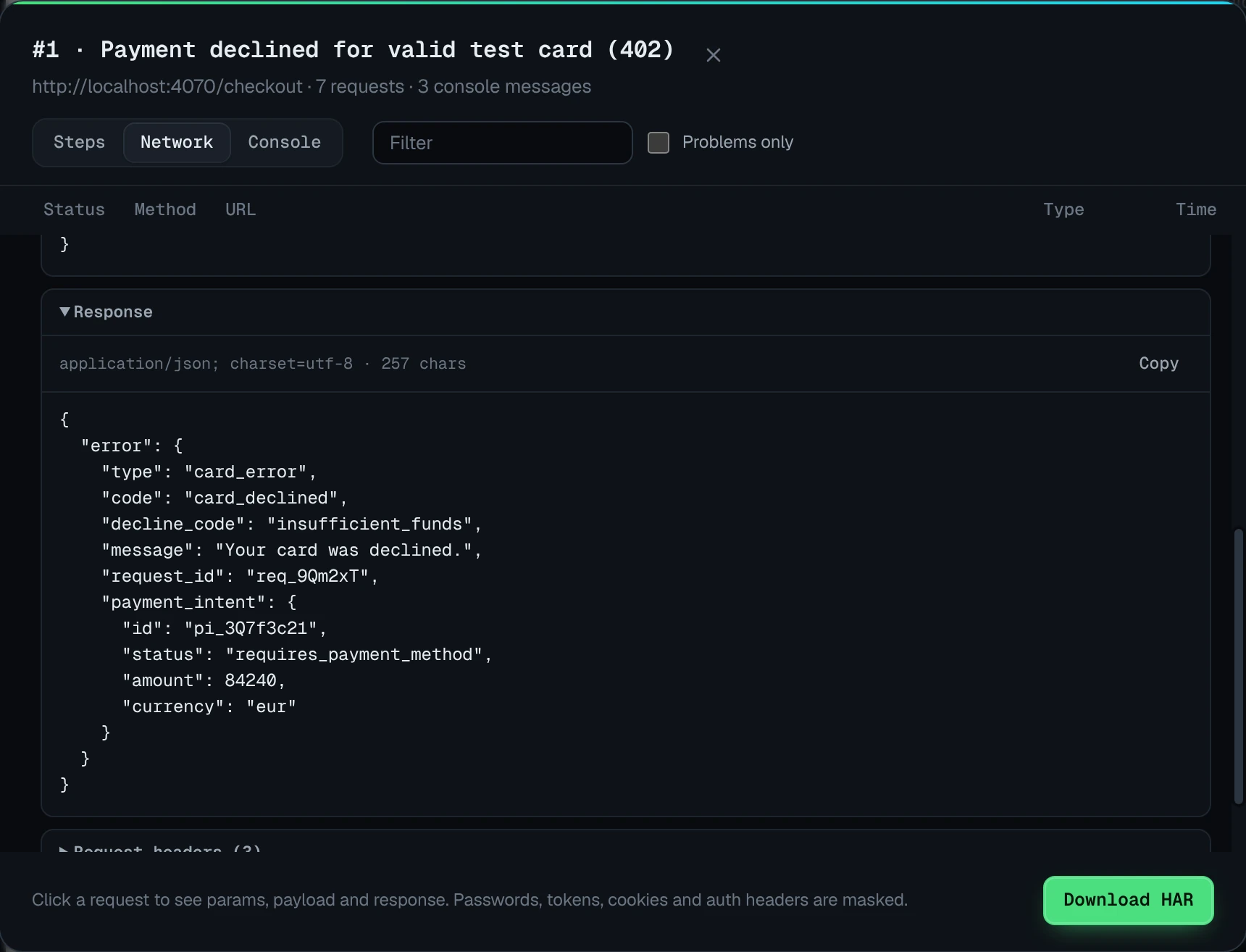
- Developer context on every capture: the last 30 actions as steps to reproduce, the last 150 console messages and errors, and the last 150 network requests with payloads and responses for recent fetch/XHR calls. Passwords, tokens, API keys and Authorization or Cookie headers are replaced with
[redacted]before saving. - Local-first data: screenshots, recordings and logs stay in your browser (IndexedDB). Nothing is uploaded to Bugmark servers; data leaves only when you export a report or create a GitHub issue.
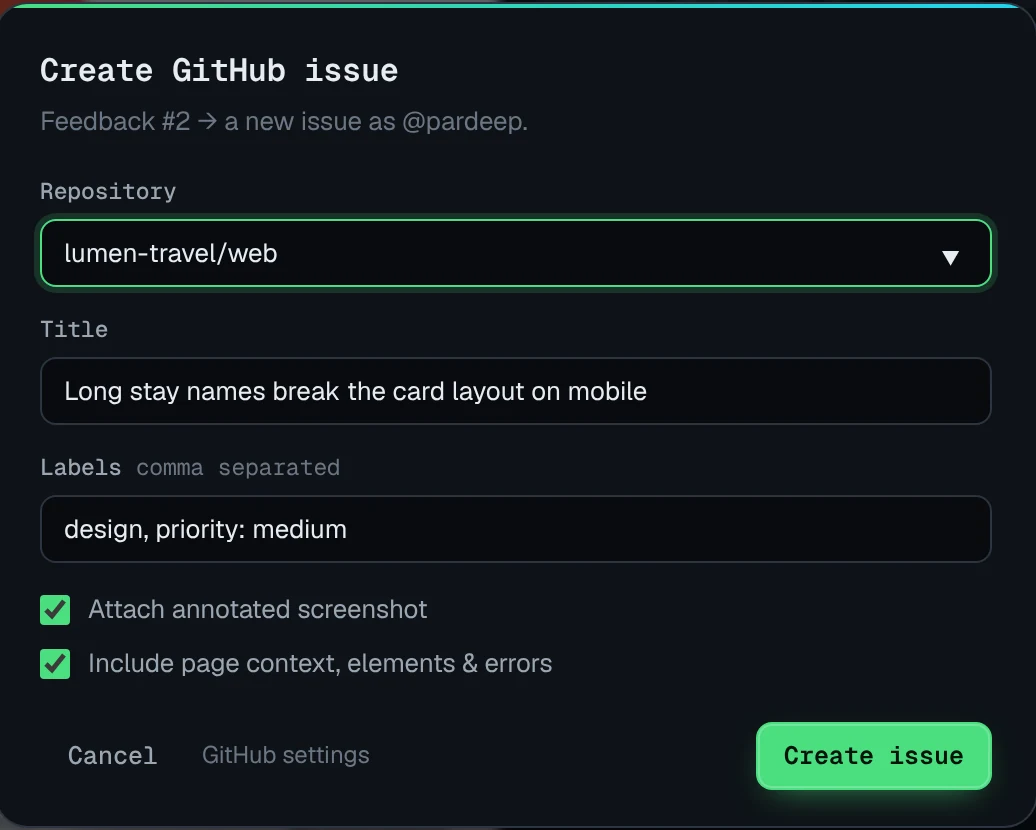
- Developer exports: Copy as cURL, Download HAR for Chrome DevTools, GitHub issues with screenshots, recordings and the HAR attached, and HTML, PDF, CSV and Markdown reports.
- Nothing to embed: no snippet on the site, so it works on localhost, staging and pages behind a login, in Chrome, Edge, Brave and Arc.
This matters most for the bugs that are hard to describe: a checkout that fails only with one promo code, an API that returns the wrong field, or an error that only appears after three clicks. Bugmark keeps the request, the response and the clicks that led there, so the developer reading the report can start with the cause rather than the symptom.
Bugmark vs Userback: feature comparison
| Feature | Bugmark | Userback |
|---|---|---|
| Price | Free to try (2 saved reports); one-time $15 for unlimited reports | Free Forever plan (feedback viewable for 7 days); paid Team, Business and Business Plus plans |
| Account required | No | Yes, for team members (seats); people submitting feedback don't need a seat |
| Where data is stored | Locally in your browser | Userback's cloud |
| Screenshots & annotation | Yes: pen, arrows, shapes, text, numbered pins, redact | Yes, annotated screenshots |
| Screen recording | Tab recording with voice, up to 5 minutes | Video recordings on all plans; session replay on Business and above |
| Console logs | Last 150 messages, errors and unhandled rejections | Business plan and above |
| Network requests with payloads/responses | Yes, with secret masking, cURL and HAR download | Network requests on Business and above; payload detail not specified on their pricing page |
| Steps to reproduce | Last 30 actions, editable | Session replay with feedback on Business and above |
| Integrations | GitHub issues; CSV and Markdown export for Jira, Linear, Slack | Jira (two-way), ClickUp, Asana and more from Team; Slack and Teams notifications |
| Share links/collaboration | No hosted links or widget; self-contained HTML report export | Shared inbox, feedback widget, surveys and team roles |
| Browsers | Chrome, Edge, Brave, Arc | Extension for Chrome, Firefox and Edge, plus a website widget |
Competitor details checked October 2026 from their public website; plans and features change, so check their site for current details.
Key differences in practice
Userback and Bugmark both produce annotated bug reports, but they are built for different people in the process.
- Who reports. Userback is built to collect feedback from users and stakeholders at scale, through a widget, surveys or its extension. Bugmark is built for the person doing the testing, who installs one extension and captures everything locally.
- Where technical context sits. Userback includes console logs, network requests and session replay from the Business plan. Bugmark attaches steps, console history and network data, including payloads and responses with secrets masked, to every capture in both the free version and Pro.
- How you pay. Userback plans are subscriptions with seat and project allowances. Bugmark is a single $15 payment for unlimited reports, with no seats or renewals, which suits freelancers and small teams who report their own bugs.
If your goal is to hear from customers inside your product, Userback is purpose-built for that. If your goal is to hand developers a report they can reproduce in minutes, Bugmark covers that job for a one-time price.
How to try Bugmark as a Userback alternative
- Add Bugmark from the Chrome Web Store — click Add to Chrome and confirm. No account needed, and it works in Chrome, Edge, Brave and Arc.
- Reproduce a bug you recently received through Userback and press
Alt+Shift+Sto capture it. - Open the network log, filter to failures and check the request payload and response that came with the capture.
- Connect GitHub in settings with a fine-grained token or OAuth device flow and create an issue from the capture.
- For Jira or Linear, export CSV or copy Markdown from the dashboard.
Collecting feedback from clients rather than users? See the website feedback tool page, or learn how to write a bug report developers can fix. Add Bugmark to Chrome — free to try.
Frequently asked questions
Is Bugmark a free Userback alternative?
Bugmark is free to try with every feature unlocked, limited to 2 saved reports at a time. A one-time $15 payment removes the limit for unlimited reports, with no subscription, seats or account. It covers screenshots, tab recording with voice, console logs, network payloads and steps to reproduce, but not end-user widgets, surveys or a shared inbox.
Does Bugmark have a feedback widget like Userback?
No. Bugmark runs as a browser extension, so whoever captures a bug needs it installed in Chrome or a Chromium browser such as Edge, Brave or Arc. If you need customers to report from inside your app, Userback's widget and surveys are designed for that. Bugmark reports are shared through GitHub issues or exported HTML and PDF files.
Does Userback capture console and network logs?
According to Userback's pricing page, console logs, network requests, custom data and session replay with feedback are included on the Business plan and above. Bugmark captures console messages, network requests with payloads and responses for recent fetch/XHR calls, and steps to reproduce on every capture, in both the free version and Pro.
Where does Bugmark store my bug reports?
Bugmark stores screenshots, recordings and logs in your browser using IndexedDB on your own device. Nothing is uploaded to Bugmark servers. Data leaves your machine only when you export a report, such as HTML, PDF, CSV or Markdown, or when you create a GitHub issue.
Can I use Bugmark and Userback together?
Yes. A common split is Userback for customer and stakeholder feedback in production, and Bugmark for internal QA passes where testers need full network and console context. Both offer browser extensions that can be installed side by side; if keyboard shortcuts conflict, change them in chrome://extensions/shortcuts.
Try Bugmark free — no account needed
- Screenshots & screen recording
- Console & network logs
- Steps to reproduce
- GitHub issues & reports